I needed a place to publish my journal entries and showcase the projects I’ve been working on. A few people suggested platforms like Medium and SubStack, but I’m more interested in building cool websites than building a subscriber base (been there, done that, kept the receipts).
This wasn’t a “build a quick portfolio in an afternoon” story. I took some time to make deliberate architectural decisions, learn a new framework, and think about what it means to build an “AI-native” website in the sense that data infrastructure (e.g., vector database), conversational interfaces, and other elements were accounted for as part of the original design (vs. bolting a chatbot onto Drupal or WordPress).
The website came together in four major phases:
- MVP: Static pages, minimalist design, essential metadata, basic publishing workflow
- Discovery: Unified site search with 3 search result tiers (keyword, RAG, Ask AI)
- Interactivity: AI Actions toolbar on journal and project pages (Summarize, Listen, Ask AI)
- Visual accoutrements, infrastructure hardening, AI evaluation: shiny objects, hidden work
Some features are frivolous. Some features do heavy lifting. All of them were fun to build.
Phase 1: Initial MVP Build
Phase 1 is a static site deployed to richardthomchick.com. Built with Astro 5 and Tailwind CSS 4, it ships zero JavaScript to the browser; every page is static HTML. I was tempted to use Hugo, which I already know well. But Astro treats React components as first-class citizens, which will make it easier to implement dynamic features like chat and semantic search.
Content
The site has five core sections: a homepage with a featured journal entry, recent entries, shipped projects, and a reserved hero slot; individual journal entry and project pages; and an about page. Content lives in markdown files with YAML front matter schemas validated at build time. An entry won’t build if a required field is missing; the framework catches it before deployment.
Design
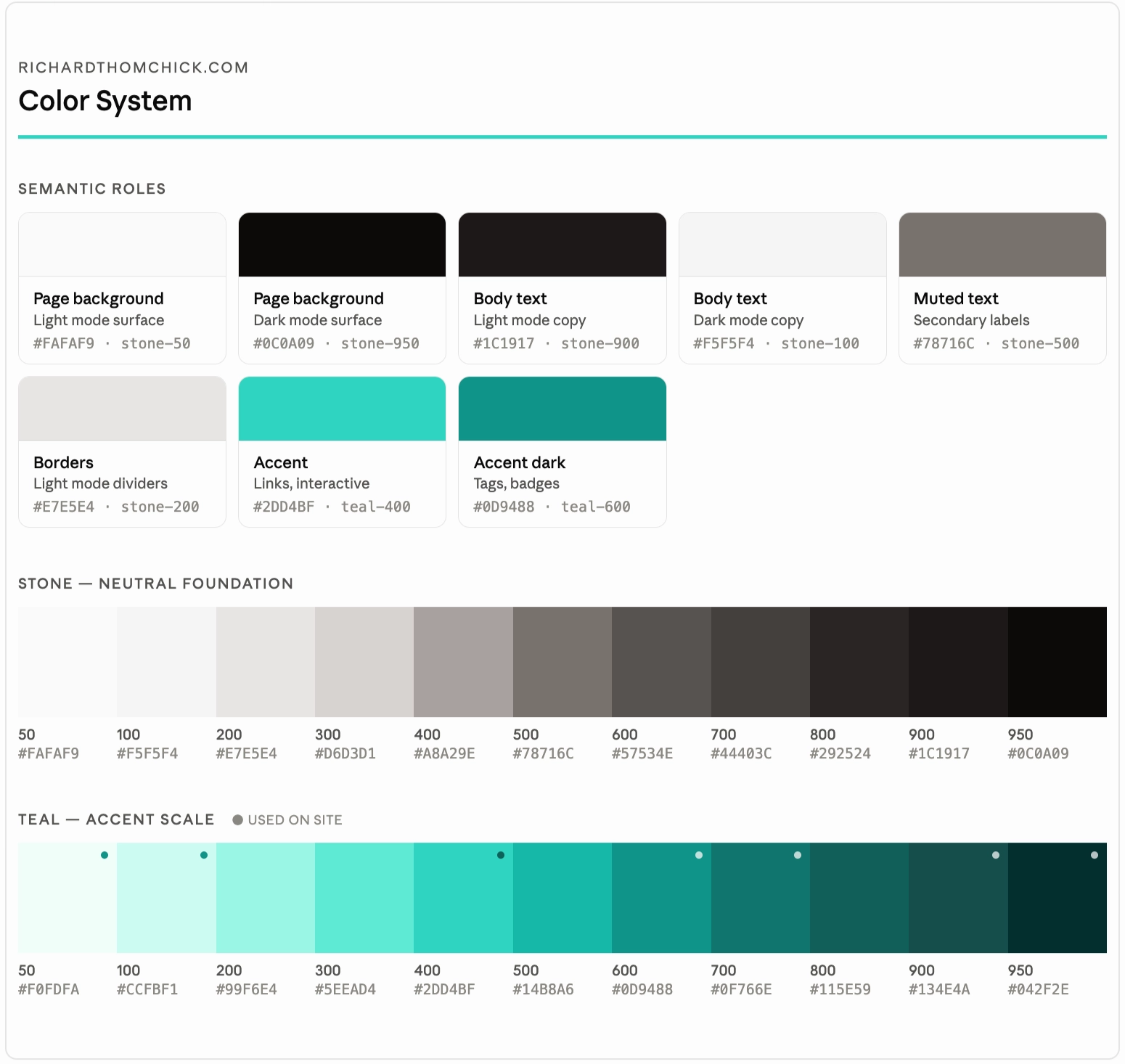
The visual design is intentionally minimal and spare. For the MVP, I focused on color and typography only. Just barely enough to give the site a coherent design language and a clear upgrade path. UX components, shadow DOM, tokens—all that stuff will come later as I build out the site. My intent is to prioritize conversational UI over traditional components like cards.
Deployment
Deployment is a one-step operation: git push triggers an automatic Vercel rebuild. No CI/CD pipelines yet. I did however automate the publishing workflow by building a reusable Claude Code skill, (/publish-journal) that ingests my draft content, generates the markdown file, builds the site to verify no broken references, and then commits and pushes everything. What used to be almost an hour of repetitive tasks is now a single command.
The key constraint I had to build in explicitly: do not rewrite the author’s prose. Without that guardrail, Claude Code will try to “improve” your writing, as I experienced first-hand.
Phase 2: Unified Search
Some people say search isn’t sexy, but I love to geek out on information retrieval and I was especially eager to implement RAG and chat alongside traditional keyword search.
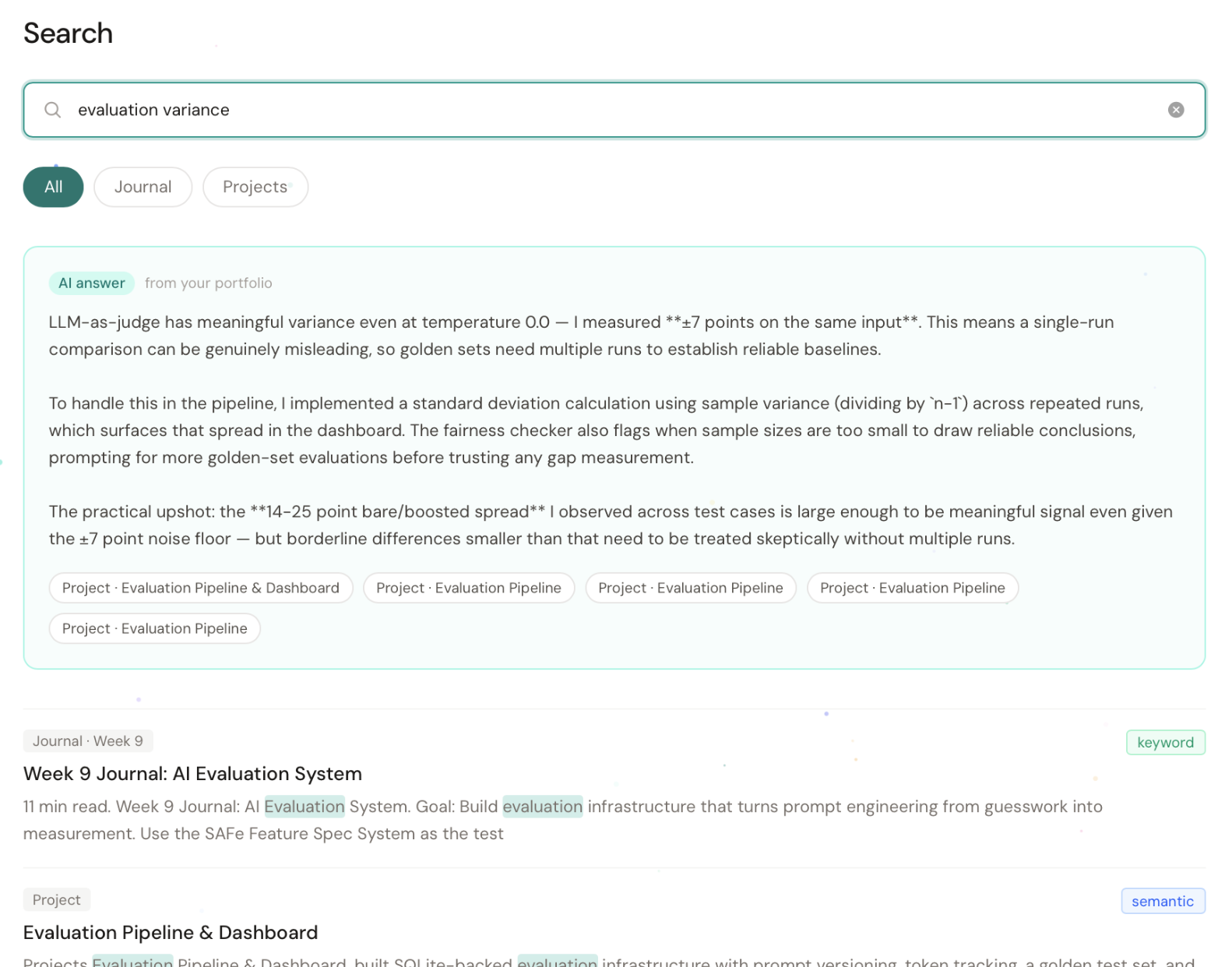
Phase 2 adds three-tier search: keyword search via Pagefind (built at build time), semantic search via OpenAI embeddings and Pinecone, and a RAG “Ask AI” mode powered by Claude. The vibe I was chasing: something like AI Mode (Google) or Genius Results (ServiceNow). Type a query, and three things happen simultaneously:
- Keyword search (Pagefind) runs a keyword search client-side with zero API calls
- Semantic search (OpenAI embeddings + Pinecone) runs on the server side to find conceptually related content even when the exact words don’t match
- Claude synthesizes an AI answer from the top results and streams it back, with inline citations linking back to specific journal entries and project pages
The AI answer card sits above everything in a teal-accented panel with a grounded, first-person response sourced from the actual journal content. Below it, keyword and semantic results merge into a single ranked list with badges showing which method found each result. Metadata filters (All / Journal / Projects) let readers narrow results on the client side.
Phase 3: Interactivity (Summarize, Listen, Ask AI)
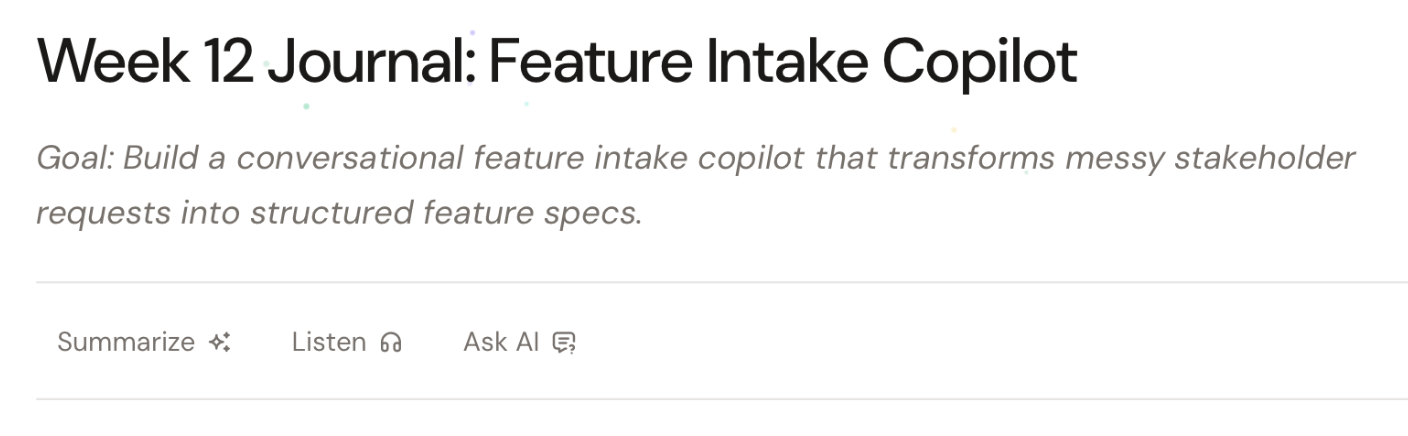
Phase 3 is where the site started doing things that static sites can’t. The centerpiece: a Content Actions feature that enables visitors to interact with the content. Every journal entry and project page now has a horizontal action bar between the header and the body that enables visitors to summarize, listen to, and ask questions about the content.
Summarize
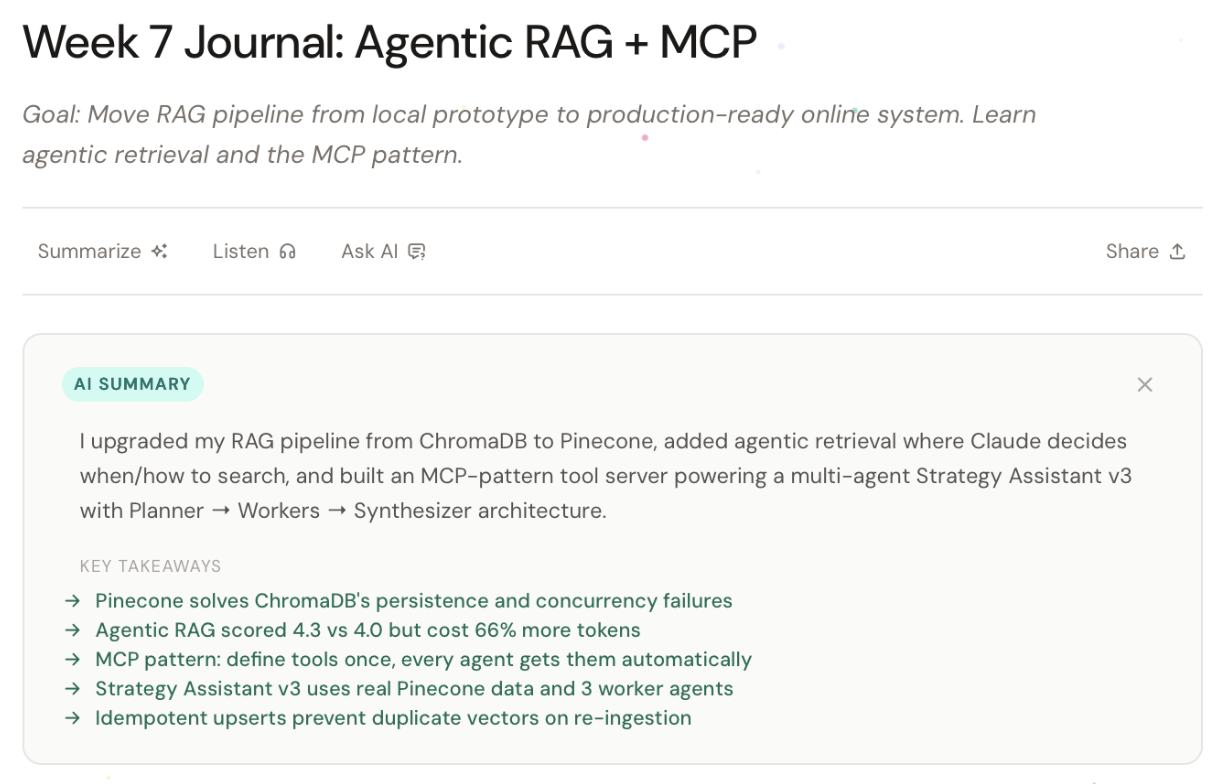
The Summarize feature loads an AI-generated summary at build time with deep-linked key takeaways that scroll you to the relevant section. Here’s how it works:
- Build time:
generate-summaries.tsruns as a prebuild step, calls the Anthropic API for each content entry, and writes a JSON file tosrc/data/summaries/{slug}.jsoncontaining anoverviewstring and akeyPointsarray (each with aheadingIdandtitle) - Server-side (Astro): The page passes that JSON to
ContentActionsas thesummaryprop, which embeds it in the HTML as a<script type="application/json">tag. The button is disabled (hasSummary = false) if no summary file exists for the entry. - Client-side on click: The JS reads the embedded JSON, builds the panel HTML, then simulates a typewriter/streaming effect using
requestAnimationFrameover ~1100ms to animate theoverviewtext character-by-character — giving the impression of a live AI response even though it’s static. After the text finishes, the key takeaways fade in staggered intervals. Each takeaway is a button that scrolls to the corresponding heading in the article.
Listen
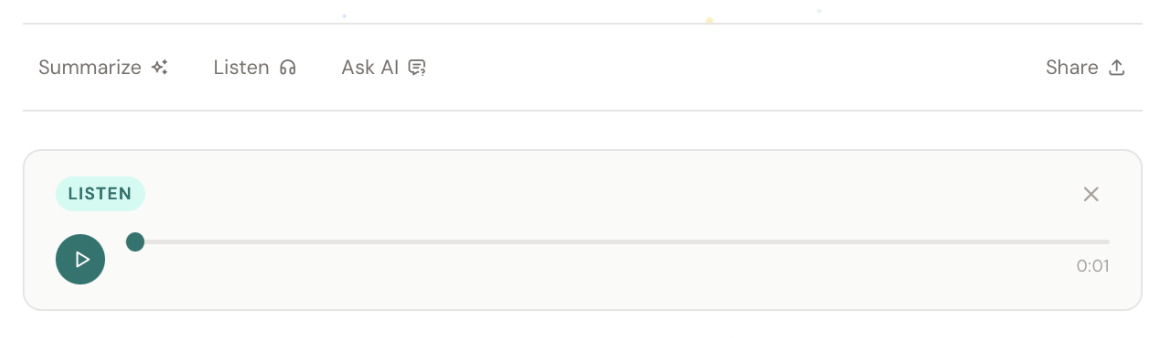
The Listen feature activates a browser-native TTS player. It narrates the content like an audiobook. Good for when you’re on the go. No server calls, no audio files. When clicked, it:
- Scrapes the article text from the DOM (
.prose, article, main), stripping out code blocks, nav, footer, and the toolbar panels themselves - Builds an inline mini-player with a play/pause button, a progress scrubber, and a time display
- Feeds the text to
window.speechSynthesisviaSpeechSynthesisUtteranceat 0.95x rate, en-US - Simulates progress with
requestAnimationFrameagainst a word-count estimate (~150 wpm), since the Web Speech API gives no real position data - Supports scrubbing — dragging the range input slices the article text at the corresponding character offset and restarts synthesis from that point
The button is gated by a hasAudio prop (disabled/greyed when false) and a 'speechSynthesis' in window check, so it silently hides itself in unsupported environments. No audio files are pre-generated or stored; it reads whatever text is live on the page.
Ask AI
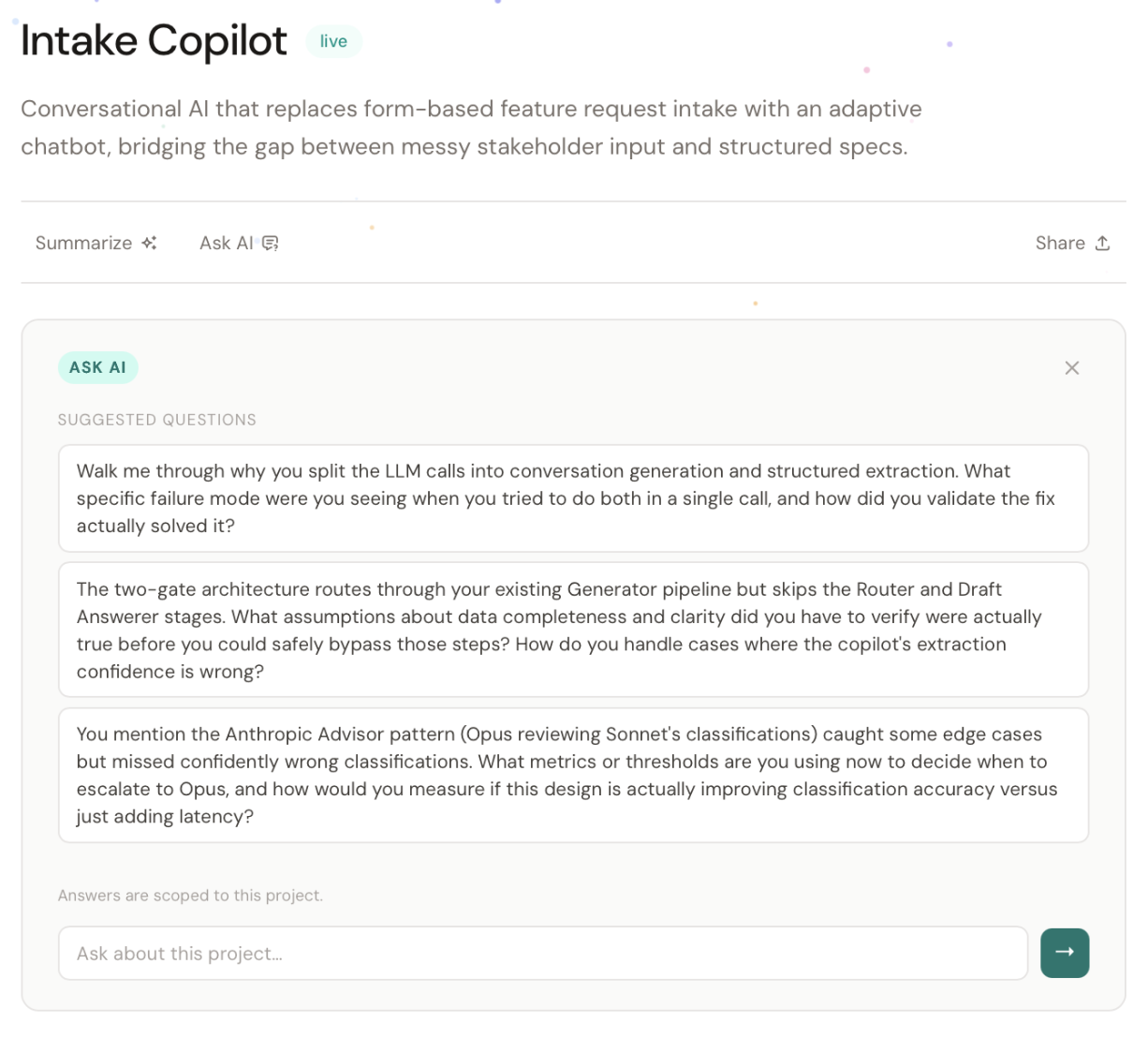
The Ask AI feature is a live RAG chat panel scoped to the current page. It uses the same architecture as global search (Phase 2), but with the context parameter set to project or journal. Here’s the flow:
- Setup (build time):
generate-questions.tspre-generates 3–5 suggested questions per entry and stores them insrc/data/questions/. These are embedded in the panel as starter buttons. The Ask AI button is disabled if no questions file exists for the entry. - On click: The panel renders with the suggested questions staggered in. The user can click a starter or type a free-form question.
- On submit: The client POSTs to
/api/searchwith the question, the page’sslug,context(journal vs. project),stream: true, and the accumulated conversationhistoryfor multi-turn support. - Streaming response:
/api/searchreturns a Server-Sent Events stream. The client reads it with aReadableStreamreader, parsingevent: ai-chunktokens (flushed to the DOM viarequestAnimationFramefor smooth rendering) andevent: sourcespayloads. Sources render as footer links — either section anchors within the current page (journal entries only) or cross-links to related project/journal pages. - Post-stream: The Q&A pair is appended to
historyfor the next turn.
Answers are explicitly scoped to the current entry. The slug is passed to the API so it can constrain its Pinecone vector search.
GitHub Code Blocks
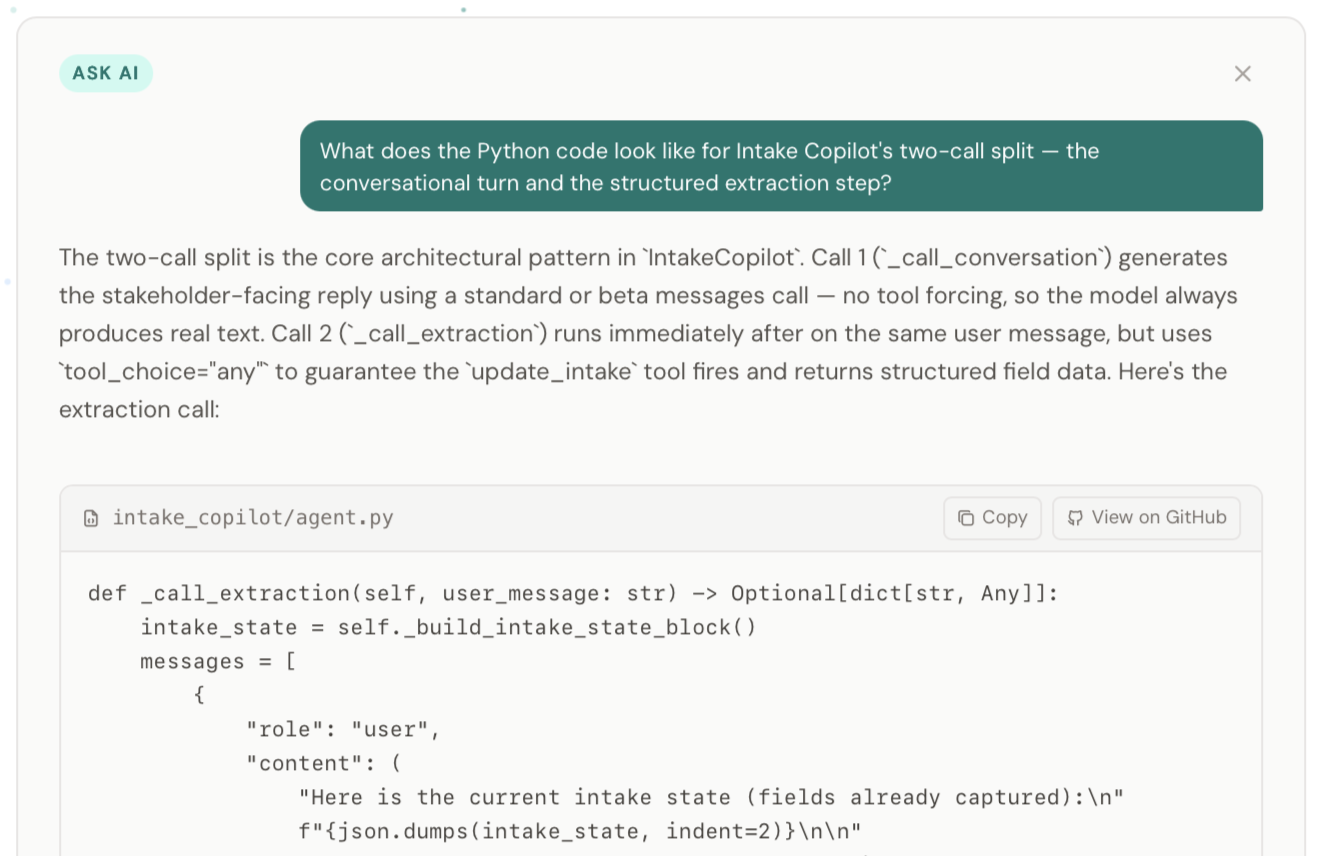
Last but not least, I built the feature that (maybe) no other portfolio sites have: Ask AI on project pages can now answer implementation questions with real code from the corresponding GitHub repo, and includes source filenames, Copy buttons, and deep links to view the source on GitHub.
The GitHub code block functionality is a pipeline that runs across three layers:
1. Indexing time (index-content.mjs): For project pages that have linked source files, the indexer splits each source file into function/class-level chunks, embeds them, and stores each chunk in Pinecone with a githubUrl metadata field that directly links to that file on GitHub (https://github.com/{repo}/blob/main/{relativePath}).
2. API (/api/search): When a question is answered, the Pinecone results include those code chunks. The githubUrl from their metadata is passed through to the sources SSE event sent back to the client.
3. Client rendering: After the full streamed answer arrives, the client checks if the answer text contains any code fences. If it does:
- It replaces the plain-text content with formatted HTML via
processAnswerText(), which wraps each code block in a styled<div class="code-block">with a header bar and copy button injectGithubButtons()then finds deduplicatedgithubUrlvalues from the sources and appends a “View on GitHub” link into each code block’s header bar, also replacing the generic language label in the filename slot with the actual relative file path (scripts/index-content.mjsinstead of justjavascript)
The net effect: when Claude’s answer includes a code snippet that came from an indexed source file, the code block automatically gets a GitHub link pointing to the exact file it came from.
The table below provides more details about the GitHub code block functionality:
Indexing pipeline (index-content.mjs) |
New indexProjectSourceCode() function walks a local repo directory, filters source files (.py, .ts, .js, .mjs; excludes node_modules, __pycache__, .git, etc.), and chunks them at function/class boundariesChunking rules: files ≤100 lines indexed whole; Python splits at def/class boundaries; JS/TS splits at function/class/export boundaries; fallback to 80-line fixed chunks. Max 3000 chars per chunk for embedding, 8000 chars stored in Pinecone metadata for RAG contextMetadata schema: chunkType: 'code', language, sourceFile (relative path), githubUrl (full GitHub permalink), section (function/class name extracted from first line)• ID scheme: {slug}#src-{fileIndex}-{chunkIndex} — no collision with prose chunk IDs |
Retrieval (search.ts) |
Project-context queries use topK: 8 (up from 6) to accommodate code chunks alongside proseCode chunks formatted as [Code: {section} - {language}] in Claude's context blocksgithubUrl passed through in the SSE sources event payload |
| Grounding discipline | System prompt explicitly restricts code blocks to answers backed by actual [Code: ...] chunks in contextWhen only prose chunks are retrieved, Claude answers in prose — no synthesized code blocks that look like they came from the repo but didn't |
Frontend (ContentActions.astro) |
Code block header shows sourceFile (e.g., src/api/main.py) instead of language label when source metadata is availableCopy button + View on GitHub button in code block chrome (GitHub link injected post-stream after sources event provides the URL)Jump to anchor pills hidden on project pages (too short to be useful); retained on journal entries GitHub buttons deduplicated by URL before rendering |
| Architecture | Extensible — adding another project is one entry in the sourceProjects array plus a re-indexSingle Pinecone index ( portfolio-search) holds all content types: journal prose, project prose, project source code. The slug filter and chunkType metadata handle scopingNo new API endpoints, no new indexes, no client-side changes to the search flow |
Phase 4: Visual Accoutrements, Infrastructure Improvements
Motion and Responsiveness
The motion system is a set of five CSS utility classes plus one JS observer, all defined in src/styles/global.css:107 and wired up in src/layouts/BaseLayout.astro:90. Every effect respects prefers-reduced-motion.
| Effect | Details |
|---|---|
Scroll Reveal (.reveal) |
Elements start invisible and translated 20px down. BaseLayout runs a single IntersectionObserver (threshold 0.1) that adds .visible when an element enters the viewport, triggering a fadeSlideUp keyframe animation (0.5s, spring easing). The observer unsubscribes after firing so it only runs once per element. |
Stagger (.stagger > .reveal) |
A parent .stagger wrapper applies animation-delay to each .reveal child via :nth-child selectors, capping out at 0.32s for the 8th+ child. Used on card grids so items cascade in (vs. all appearing at once). |
Card Hover Lift (.card-hover) |
Pure CSS. Cards translate up 3px with a box-shadow on hover (0.2s spring transition). |
Link Underline Slide (.link-slide) |
A ::after pseudo-element starts at width: 0 and expands to 100% on hover, creating a sliding underline from left to right. |
Page Load Fade (.page-enter) |
The entire page content wrapper fades in from opacity 0 over 0.3s on every navigation. Applied to the <div class="page-enter"> wrapper in BaseLayout. |
Ambient Background Animation: Starry Night and Neural Field
Dark mode got an ambient upgrade: a canvas-based starfield that renders 220 twinkling stars with randomized shooting stars every 8-18 seconds. The starfield responds to theme changes in real-time via a MutationObserver on the HTML element’s class list. Toggle from Light to Dark, and the stars fade in over one second. The entire animation runs in a single <canvas> element; no DOM elements, no injected stylesheets, no performance overhead in Light mode (the requestAnimationFrame loop idles when the canvas opacity is 0).
Light mode background system overhauled. Two major changes from v4:
1. Fade alignment with Starry Night. Nodes now use a four-state lifecycle (waiting → rising → holding → falling) matching dark mode behavior. Each node reaches exactly 100% of its personal target opacity at apex — no overshoot. Glow effects (shadowBlur, shadowColor) removed entirely. Opacity range 0.15–0.70 per node for natural brightness variation.
2. Neural vectors. The old constellation connection system replaced with directional impulse vectors:
- Angular zig-zag paths, 5–8 segments, traveling left-to-right across the canvas
- Fire every 3–8 seconds at semi-random intervals
- Comet-style fading trail (35% of path length, 24 gradient segments)
- 2.2px leading dot at the signal head
- Node activation: any node within 50px of the signal head pulses to near-full opacity, then decays back — neurons firing as the impulse passes
- Mental model: information traveling through a transformer neural network layer to layer, or synaptic impulses racing from neuron to neuron
Also removed: weighted edge distribution (70/30 formula). Nodes now distribute uniformly across the full canvas via pure Math.random().
The Starry Night dark mode background is now the official name (parity with Filament Flash). Together they form the ambient background system.
Infrastructure Hardening
Five targeted changes to reduce attack surface and improve build reliability:
- Deleted
/api/semantic-search, a legacy non-streaming endpoint not wired to any UI. Also removedsearch-v1.astro, the only file referencing it, itself unreferenced. Attack surface reduced from two serverless functions to one. - Build resilience for generate scripts: both
generate-summaries.tsandgenerate-questions.tswrapped in top-level try/catch that exit 0 on error. A transient Anthropic API hiccup during a Vercel build now logs a warning instead of killing the deploy. generate-questions.tswired intoprebuild: previously a manual step, now runs automatically aftergenerate-summaries.tson every Vercel build. Both scripts are incremental, so the cost per build is near-zero.- Indexer preflight + chunk count logging:
index-content.mjsnow checks forOPENAI_API_KEYandPINECONE_API_KEYat startup and exits immediately with a clear error if either key is missing. Summary log at completion reports prose and source-code chunk counts separately. - Rate limiting attempted, reverted:
vercel.jsonwith aratelimitblock was deployed but failed schema validation. Removed and returned to backlog. The/api/searchendpoint remains the one genuine liability because each request fans out to OpenAI, Pinecone, and Anthropic with no throttling. I’ll need to fix it sooner rather than later.
Evaluation Infrastructure for Ask AI
Motivated by a P0 grounding failure discovered during a UX audit, I built a full evaluation mechanism for the Ask AI feature.
Root cause diagnosis: Ask AI on the Week 9 entry denied a fact the entry states (“I was skeptical at first” about content-addressed hashing). Diagnostic confirmed retrieval miss — the grounding chunk existed in Pinecone at rank 9 but journal topK was 6. Not retrieved. Fixed by raising journal topK 6→10, project topK 8→12.
Eval mechanism:
- Golden set: 15 questions across 5 page types (journal + project), weighted toward buried facts
- Retrieval check (deterministic): is the expected chunk ID in the retrieved set, at what rank?
- Grounding check (Sonnet judge): does the generated answer correctly reflect the known fact?
- Negative control: generate answer with empty context — if it passes, the question is training-leakable (model answers from training, not RAG). Result: 0/15 training-leakable — system prompt grounding instruction is effective.
- Composite
groundedCorrectmetric (retrieval AND grounding) as the headline number - Timestamped JSON results in
eval/results/
Baseline: 15/15 grounded-correct, 0/15 training-leakable. One known open item: ep-tracker (rank 11 > project topK 8) — fixed by the topK bump to 12.
Single source of truth: src/config/retrieval.js exports RETRIEVAL_TOPK — both search.ts and run-ask-eval.mjs import from it. Eliminates the parity-drift bug where the eval silently queried at a different topK than production.
Chunking experiment: banked as a documented option. The eval revealed dilution is not systemic (13/15 comfortable at rank 0–2); the targeted topK calibration was the right-sized fix.
What’s Next
MCP Server
The idea: expose my portfolio content and data (journal entries, project pages, AI summaries, etc.) as callable tools that any MCP-compatible client (Claude, Cursor, etc.) can query directly, without a browser involved. Instead of visiting the site, a client could call tools like get_journal_entry("week-17"), search_projects("RAG"), or ask_portfolio("what has Richard built with Pinecone?") and get structured data back. Under the hood, the server would read from the same sources your site uses (markdown files, Pinecone index, the precomputed summaries in src/data/), bypassing the web layer entirely.
The practical use case: someone could drop my MCP server into their Claude setup and have a conversation with my work the same way they’d chat with a codebase. It also makes my content composable; another agent could pull my journal entries as context while drafting something, without knowing my site exists or having to visit it directly.
Listen v2
AI-generated audio is not my highest priority, but I want to learn how to go beyond the basic Web Speech API, which is admittedly awful in terms of voice quality. I have my eye on ElevenLabs, which I’m also using for my Dino project.
General-Purpose Portfolio
Once I complete these enhancements, it will likely be time to expand what has been a focused AI build log into a general-purpose portfolio.
Website fully operational at https://www.richardthomchick.com/ with a plethora of bells and whistles. Now back to our regularly scheduled programming.