I started off the week building a simple calculator tool and worked my way up to creating my first “agent” (an autonomous researcher) and a reusable tool-execution pattern underneath it.
What I Built
Calculator Tool
On Monday, Claude walked me through the creation of a tool to get local weather. Then I dipped my toes in by creating a simple calculator tool. This helped me understand the anatomy of a tool, the tool use “loop”, and how to:
- Define the tool schema
- Handle Claude’s tool use requests
- Return results back to Claude
I also started to see how the costs add up more quickly (and how important it is to manage the context window) because each tool use cycle requires a minimum of 2 API calls.
NGL, I’m struggling to understand why I would want a non-deterministic calculator.
Web Scraper, File Utility, Query Tool
Tuesday’s task was to get hands-on and start building practical tools. I worked on:
- A web scraper that lets Claude fetch and read URLs
- A file system utility that lets Claude read/write files
- A data lookup tool that lets Claude query structured data
After that, I created a combined toolkit that let Claude chain multiple tools together. “Fetch the content from https://example.com and save it to example_content.txt” became two autonomous tool calls across three API round trips. It was pretty cool to see how tool chaining created an autonomous workflow. I didn’t write IF/THEN logic. I didn’t create a workflow engine. I just gave Claude the tools, and it figured out the sequence.
ServiceNow Mock Tools, Cross-Domain Tool Chaining
The previous days’ experiments were informative, but felt abstract. On Wednesday, I worked on something more familiar that felt more like actual PM work: find a critical incident in ITSM, fetch documentation about the error from the web, and create a resolution file.
First, I created a mock data layer (no API access for now) and a tool that simulates:
- Searching for incidents
- Creating tickets
- Querying CMDB
Next, I combined the mock tool with the web scraper and file utility I created the previous day. The combination gave Claude the added ability to autonomously:
- Research a problem online
- Create a ServiceNow ticket with the findings
- Save the resolution to a file
The result was an autonomous multi-step workflow spanning three domains: ServiceNow + Web + Files. Claude decided which tools to use, when to use them, what parameters to pass, and how to combine results across tools. I wrote NO workflow logic. Claude just kind of figured it out.
Autonomous Research Agent
On Thursday, I made the leap from tools to agents. My assignment was to build a “research agent” that investigates a topic and creates a report. The goal was to make my agent as autonomous as possible. I gave it a topic, a task, a token budget, and that’s it — I left it up to the agent to decide how deep to research, when it has enough info, and how to structure outputs.
The Research Agent Pattern
User request:
“Research the latest developments in AI agents and create a comprehensive report”
Agent behavior (autonomous):
Plan: “I need to find multiple sources about AI agents” → Search/Fetch: get content from 3–5 relevant URLs → Analyze: extract key themes across sources → Synthesize: create structured report → Save: write to file with timestamp → Report: confirm completion
I didn’t tell it to do 5 steps. The agent figured that out on its own.
But this is where things broke in instructive ways. Claude hallucinated URLs for its sources and returned an error when it couldn’t fetch HTML from a non-existent webpage. It was operating in a “guess URLs and see what works” mode. On top of that:
- API calls hanging/timing out
- Huge contexts causing slow processing
- Syntax errors breaking tool definitions
Claude kept “assuring” me that Day 5’s lesson would teach me how to prevent all these issues. It felt like a cruel joke. But I worked through the issues, got the agent to work, and I now have a visceral sense of how AI agents can fail — and why.
Production-Ready Resiliency and Robustness
On Days 1–4, I encountered 404s, hanging API calls, large contexts causing slow processing, and syntax errors breaking tool definitions. On Day 5, I learned how to fix (or prevent) all of this systematically by building a robust tool execution framework with:
- Retry logic with exponential backoff (try again on transient failures)
- Timeout handling (don’t hang forever)
- Error categorization (know which errors to retry vs. skip)
- Rate limit detection (handle API throttling gracefully)
- Logging (debug what went wrong)
- Token tracking (monitor costs)
- Circuit breakers (stop after too many failures)
The code stopped looking like a demo and started looking like infrastructure. But WOW did it increase the size of the codebase. About 80% of the code was dedicated to resilience, and only 20% to the actual functionality.
Key Numbers at the End of Week
- ~1,500 lines of Python across 7+ scripts
- 7 tools implemented across 3 domains
- 4 complete agents (calculator → web → ServiceNow → research)
- A retry + logging + stats framework I can lift into every future agent
What I Learned
Tool Descriptions Are Prompt Engineering, Not Documentation
Claude reads the description field to decide when to use a tool, not just how. “Gets weather” is useless; “Get current weather conditions for a location. Returns temperature, conditions, humidity. Use for current weather, not forecasts or historical data” is actionable. Every tool schema I write is a mini-prompt teaching Claude a capability. The better I write these, the fewer prompt tweaks I need elsewhere.
The worst bug of the week — "name": "fetch_url", 1 with a stray 1 instead of a comma — taught me the flip side: a malformed schema silently removes the tool from Claude’s toolkit, and Claude will cheerfully tell the user it doesn’t have that capability. I spent 20 minutes chasing what turned out to be a single character.
Autonomy Comes at a Cost
Tool use isn’t cheap. In a basic multi-turn conversation: enter a prompt → Claude responds, enter a follow-up → Claude responds again. Two API calls and about 2,000 tokens total — roughly $0.03.
A tool-enabled conversation requires 2–3× as many API calls. Each tool cycle requires a minimum of 2 API calls: enter a prompt → Claude requests tool → you return result → Claude processes and responds. About twice the cost of a basic conversation.
But often it’s more. A more complex workflow might hit 4–6 calls per user question. And every API call includes the full context, including all tool definitions (~1,500 tokens for a modest toolkit):
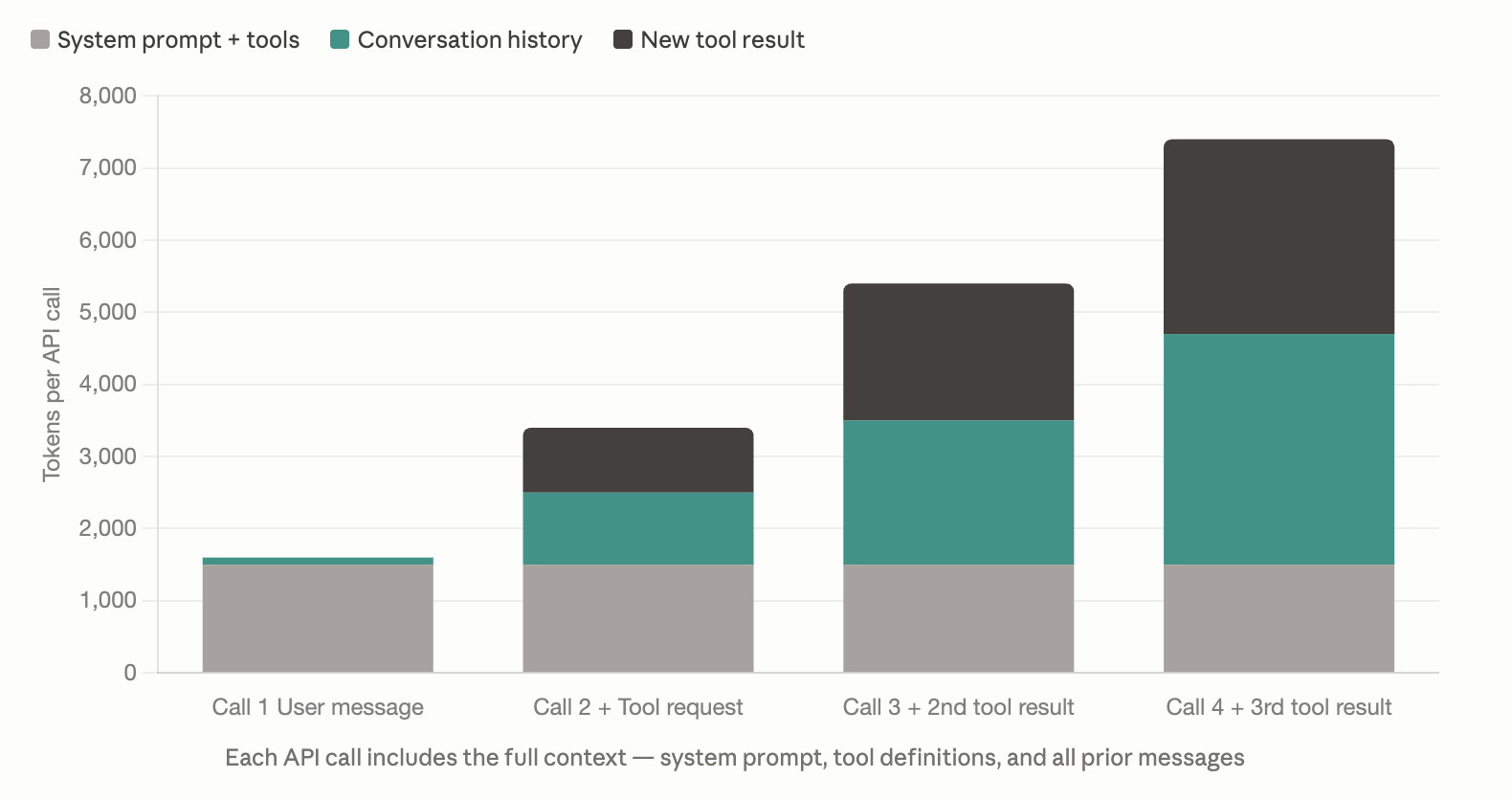
The context window fills FAST. By the time a research agent is five calls deep, it’s shipping 10,000+ tokens per round trip. The lesson learned: with agents and tool use, context management isn’t optional. It’s load-bearing.
Tool-Chaining Is Where Autonomous Workflows Begin
Business rules engines. Workflow logic. Runbooks. The brittle orchestration scaffolding that traditionally held automation together — all of those artifacts are substitutes for reasoning the system couldn’t exercise on its own. Claude doesn’t need the substitutes. It reasons at runtime, inferring the sequence, adapting to what it finds, and recovering when steps don’t go as expected — without a human pre-specifying every step in every path.
Where I Struggled
An autonomous agent that succeeds is magical. An autonomous agent that hangs on Iteration 3 is a support ticket. The question I kept returning to by Friday wasn’t whether to give the AI autonomy — it was whether autonomy was worth the unpredictability.
The Day 4 research agent was the week’s hardest lesson. I gave it a budget of 20 tool calls and asked it to research B2B personalization. It got 4 successful fetches out of 20 because Claude was hallucinating plausible URLs like gartner.com/en/marketing/topics/personalization that didn’t actually exist. “Autonomous” doesn’t mean “omniscient.” In production, I’d need to provide known-good starting URLs, give Claude a real search tool, or budget for the failure rate.
Then the agent hung on Iteration 3. No error, no timeout, just silence. With four successful fetches at 5,000–8,000 chars each, plus growing conversation history and tool definitions, I was sending 50,000+ tokens per call and asking Claude to synthesize a report from all of it. The API wasn’t hanging; it was working, slowly, on a genuinely hard task.
The fix was a dead-simple fixed workflow. One URL, one API call, one save. It ran in 60 seconds. The lesson isn’t that autonomy is bad. The lesson is that for a lot of tasks, a bounded three-step workflow beats a five-iteration agent loop. Choosing between them is a product decision.
Day 5 pushed the same point from another angle. Retries, timeouts, and backoff aren’t defensive programming — they’re user experience. A 404 shouldn’t be retried. A 503 should, with exponential backoff. A 429 means slow down, not give up. RetryableError versus NonRetryableError isn’t a code-quality concern; it’s a question of what the user sees when something goes wrong.
The smallest struggle was the most humbling. A stray 1 where a comma should have been silently removed the tool from Claude’s toolkit. I spent 20 minutes debugging Python code that looked fine before I dumped the tool list and saw only three tools going out instead of four. That bug lived in the contract between my code and Claude — a new place to look when things break.
The Week 3 Mindset Shift
I have a visceral understanding of tool use economics. I’ve tracked the API calls. I’ve seen how quickly the context window grows. And I know what each interaction costs.
My mental model has shifted. By Day 5, I realized I was building distributed systems where:
- Claude is the reasoning engine
- Tools are the action layer
- I’m the orchestrator managing flow, cost, and UX
Real-world constraints matter. While it’s tempting to think I can just give Claude tools and it’ll figure everything out, the reality is that tools fail (404s, timeouts), APIs have rate limits, context windows fill up, processing takes time, costs add up quickly, and users have patience limits. This mental model is going to apply to every AI product I build from here on.
Note: The “tools” capability I built in Week 3 is what Anthropic now calls tool use; skills emerged later as a higher-level abstraction that sits on top of tools. The tool use pattern is still the foundation. Skills are just a better way to package and reuse it.