What I Built
I converted the Feature Spec Generator from a CLI script into a Streamlit web app, deployed it to Streamlit Cloud, wired up Microsoft Teams webhook notifications, and rolled it out to my PM team with a shareable URL. The entire sprint took five days, from local setup to live users generating specs. Overall, it was pretty chill compared to the previous week.
Streamlit Setup and Local Testing**
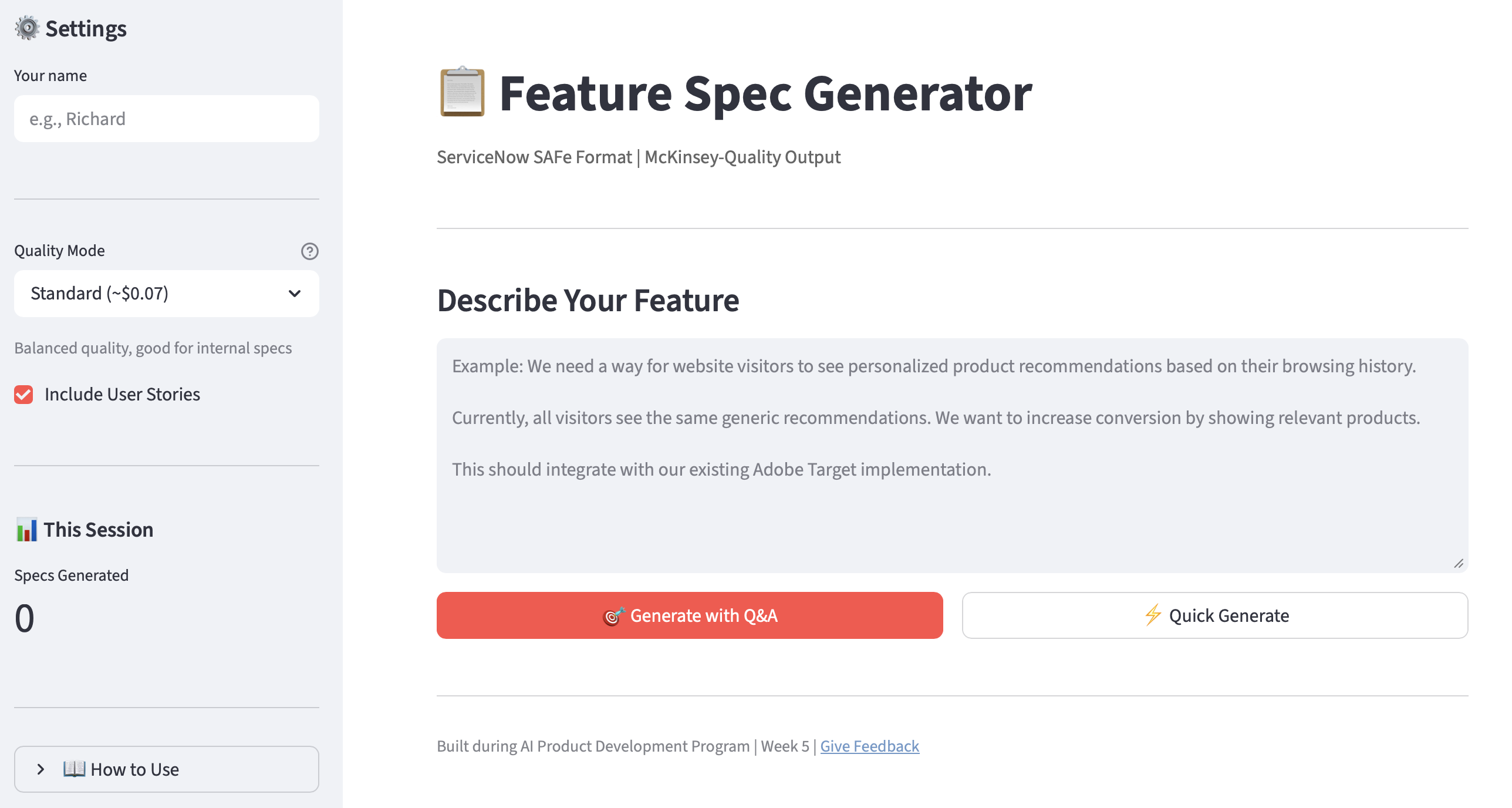
So, Streamlit. I’d never heard of it, but it was fairly easy to set up. I installed it, configured the secrets.toml file for API key management, and got my Feature Spec Generator running locally. Claude did the grunt work of refactoring the code for Streamlit. I tested the full app flow: input, Q&A mode, spec generation, and download. It needed some polish, but worked out of the box.
Testing and GitHub Prep**
On Tuesday, I tested some edge cases (empty input, short input, long input, Q&A flow abandonment, rapid clicking), added input validation, and prepped for deployment on Streamlit Cloud by initializing a Git repo and pushing it to GitHub. Nothing fancy. Next, I connected the GitHub repo to Streamlit Cloud, configured secrets in the cloud dashboard, and deployed. The app went live with a public URL in under 10 minutes once the pieces were in place.
The deployment itself was anticlimactic, which is exactly how deployment should feel. There’s only one wrinkle: the free subscription to Streamlit allows a max of two private repos. I’ll have to think about whether I want my code to be open or if I’m willing to pay for more private repos.
MS Teams Webhook Notifications**
Thursday was icing on the cake. I created an incoming webhook in a tester Teams channel, added the webhook URL to Streamlit Cloud secrets, and wired the app to post a notification card to the team channel whenever someone generates a spec. Simple visibility: teammate opens URL → generates spec → team channel gets notified.
One detail worth noting: private channels in Teams restrict connector support. Webhooks may not work in private channels. I used a standard channel and it worked immediately.
I also explored whether the notification could include a link to the generated spec. Short answer: not with the current architecture. Specs only exist in the user’s browser session. There’s no persistent URL for each generated spec. Kind of annoying. To solve that, I’d need to store specs somewhere (e.g., a database) and link to them. Definitely a backlog item. Not a Day 4 problem.
Team Rollout**
This was the fun part. I gathered a brave group of PMs who were desperate to save time on their feature writing, walked them through the Feature Spec Generator flow, and gave them all access to the tool, along with a link to a short feedback form. By the end of the day, I had 12 notifications about completed feature specs in my Teams channel, and a ton of great feedback.
What I Learned
The Streamlit Framework
Streamlit is dead-simple to use, but it took me a day or two to understand what makes the whole framework work:
- Session state — Streamlit reruns my entire script on every interaction. Without
st.session_state, clicking a button wipes all the data. - Conditional rendering — My multi-stage flow for the Feature Spec Generator (Input → Q&A → Generate → Result) lives in one file, gated by
if st.session_state.stage == "input"blocks. It creates a multi-page feel in a single-page app. - Rerun — After updating state,
st.rerun()forces the script to re-execute with the new values. State change + rerun = navigation. - Secrets — API keys live in
.streamlit/secrets.tomllocally and in the Streamlit Cloud dashboard for production.st.secrets["ANTHROPIC_API_KEY"]reads them. Never ever ever ever hardcode keys. - Spinners — API calls take 30-60 seconds.
with st.spinner("Generating...")tells users something is happening. Without it, the app looks frozen.
Sometimes “Done” is Better Than “Perfect”
I deployed the Week 2 single-agent Feature Spec Generator (v1), not the Week 4 multi-agent version with its Supervisor, Research Agent, Spec Writer, and QA Agent (v2). Claude actually made this decision without telling me, and I didn’t figure it out until I ran the app locally. I was NOT happy about it at first, but the point of Week 5 wasn’t to ship the most capable version. It was to ship the most accessible one. It was also cheaper to run:
Week  Project                   Architecture                     Cost     Complexity
───── ───────────────────────── ──────────────────────────────── ──────── ──────────
2     Feature Spec Generator    Single agent, CLI                 ~$0.05   ⭐
4     Advanced Feature Spec     Multi-agent + QA + Resilience     ~$0.12   ⭐⭐⭐⭐⭐
5     Streamlit App             Single agent, Web UI              ~$0.05   ⭐⭐
More importantly, the app provided just enough for me to get real-world feedback (and feature requests!) from potential users. Their input changed my perspective on what the app should do and I am now motivated to work on v3 (which of course will include a multi-agent architecture with robust resilience and context window management).
Teams Webhooks as Minimal-Viable Observability
A notification card in a Teams channel isn’t a monitoring dashboard. But it’s enough. When someone generates a spec, the team sees it. Our manager sees it. The webhook only took 10 minutes to set up, and answered the most important question: “Is anyone using this?” Everyone loved it—and immediately asked for enhancements: include a preview of the spec, link to the generated output, add analytics. Suddenly, I had a backlog just for notifications.
What I Struggled With
Week 5 was mostly painless, aside from Claude going rogue with Feature Spec Generator v1. The secrets.toml debugging on Day 1 was the only real friction point, and it resolved in a few minutes. No hanging API calls, no architectural dead ends, no hallucinated URLs.
After the Week 3 research agent that hung on Iteration 3 and the Week 4 deep dives into resilience patterns, a deployment week with no significant struggles felt almost suspicious. But that’s the point: the hard work of previous weeks (error handling, API patterns, debugging instincts) made this week’s execution clean.
Week 5 Wrap
Weeks 1-4 were about increasing technical depth. Each week added a new layer: fundamentals, tools, systems, architecture. Week 5 broke the pattern. Instead of going deeper, I went wider, taking something I’d already built and putting it into real users’ hands.
The hardest part wasn’t the code. The Streamlit conversion was straightforward, the deployment was anticlimactic, the webhook integration took minutes. The hard part was the operational stuff: secrets management, repo structure, notification wiring, writing the team announcement. The “boring” stuff. None of that is technically complex. All of it is necessary.
Week 5 complete. First AI product shipped to real users. Next week’s goal: Stop hallucinations.