What I Built
Most people don’t like filling out forms. Especially long ones that ask for information they don’t have. In the realm of product management, feature request forms are among the most reviled constructs known to humankind. Dear stakeholder, can you please:
- Enter the estimated revenue impact (provide dollar amount and calculation methodology)
- Explain why this should be prioritized over other requests in the backlog
- Select an accessibility level (WCAG 2.0 A, WCAG 2.0 AA, WCAG 2.1 AA, Section 508)
Many times, the person filling out the form will just type something like “IDK” and then wait in suspense as their request is processed in a black box. What often ensues is an atmospheric river of emails, messages, Zooms, and pings as the product manager desperately tries to figure out WTF the requestor actually needs.
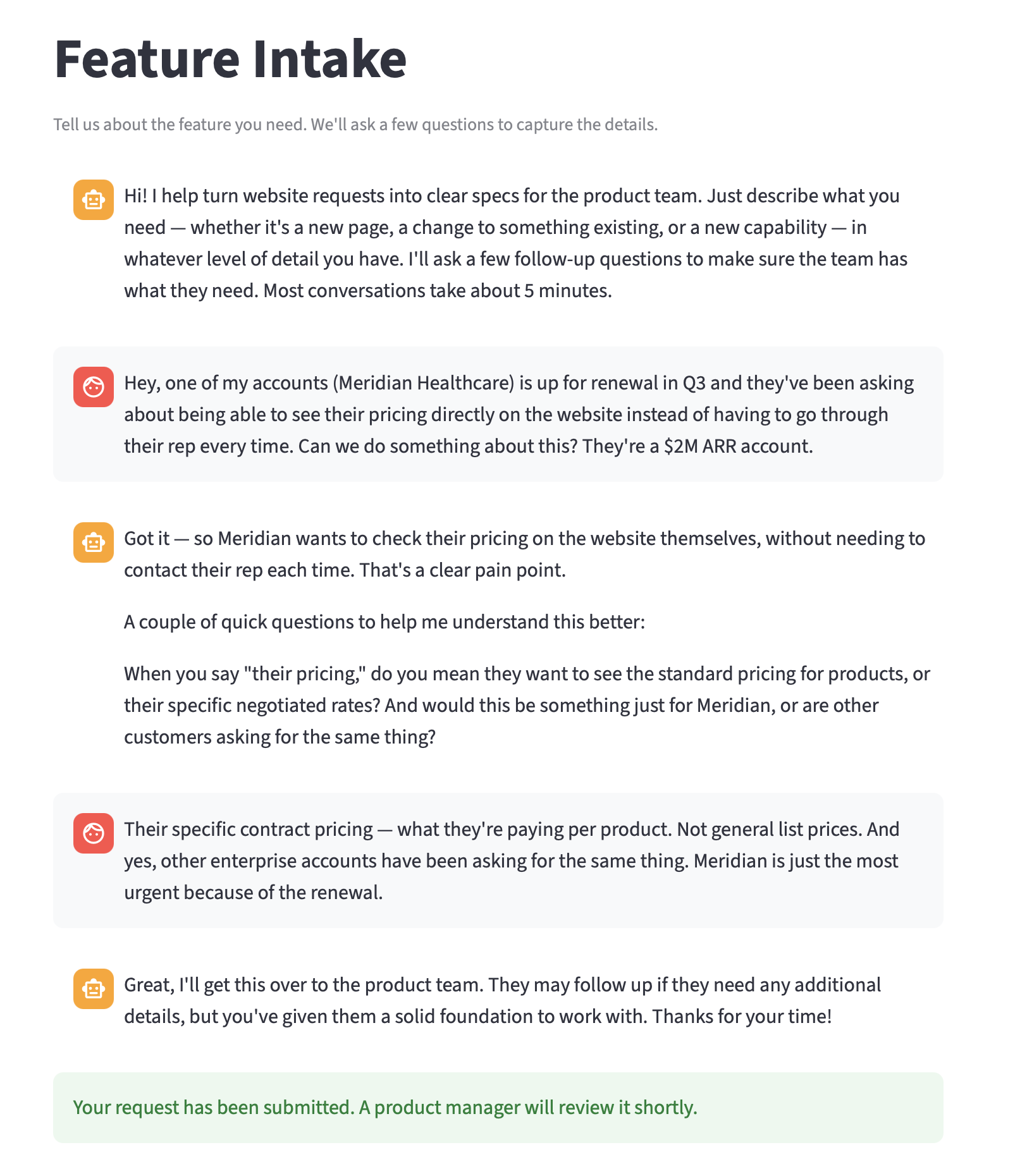
This week, I replaced that whole mess with a conversational interface, the Intake Copilot, that acts as the front door to my SAFe Feature Spec System, meeting stakeholders where they are and dealing with ambiguity to put something actionable in the PM’s queue.
Conversational Intake Engine
The core build this week: an AI copilot that greets stakeholders in plain language, asks adaptive follow-up questions, and produces a structured intake record for the PM. No SAFe terminology, no feature type classifications, no required fields. The stakeholder describes what they need in their own words, the copilot identifies information gaps, asks a few questions, summarizes the feature request, and submits it PM for initial review with a go/no-go recommendation.
I synthesized three personas and use case scenarios to validate the approach:
- Sales engineer forwarding a customer pricing request
- Marketing manager requesting a campaign landing page
- Engineering lead requesting a GraphQL schema
While these helped me shape the conversation, the copilot actually adapts its question strategy based on the input it receives, not on a persona label. A vague request gets extraction questions (“What do you need? Who is it for?”). A request with strong business context but no technical detail gets gap-filling questions (“How should this behave for returning visitors?”). A technically detailed request with no business justification gets reverse extraction (“What problem does this solve for users?”). The copilot reads the signal density and adjusts.
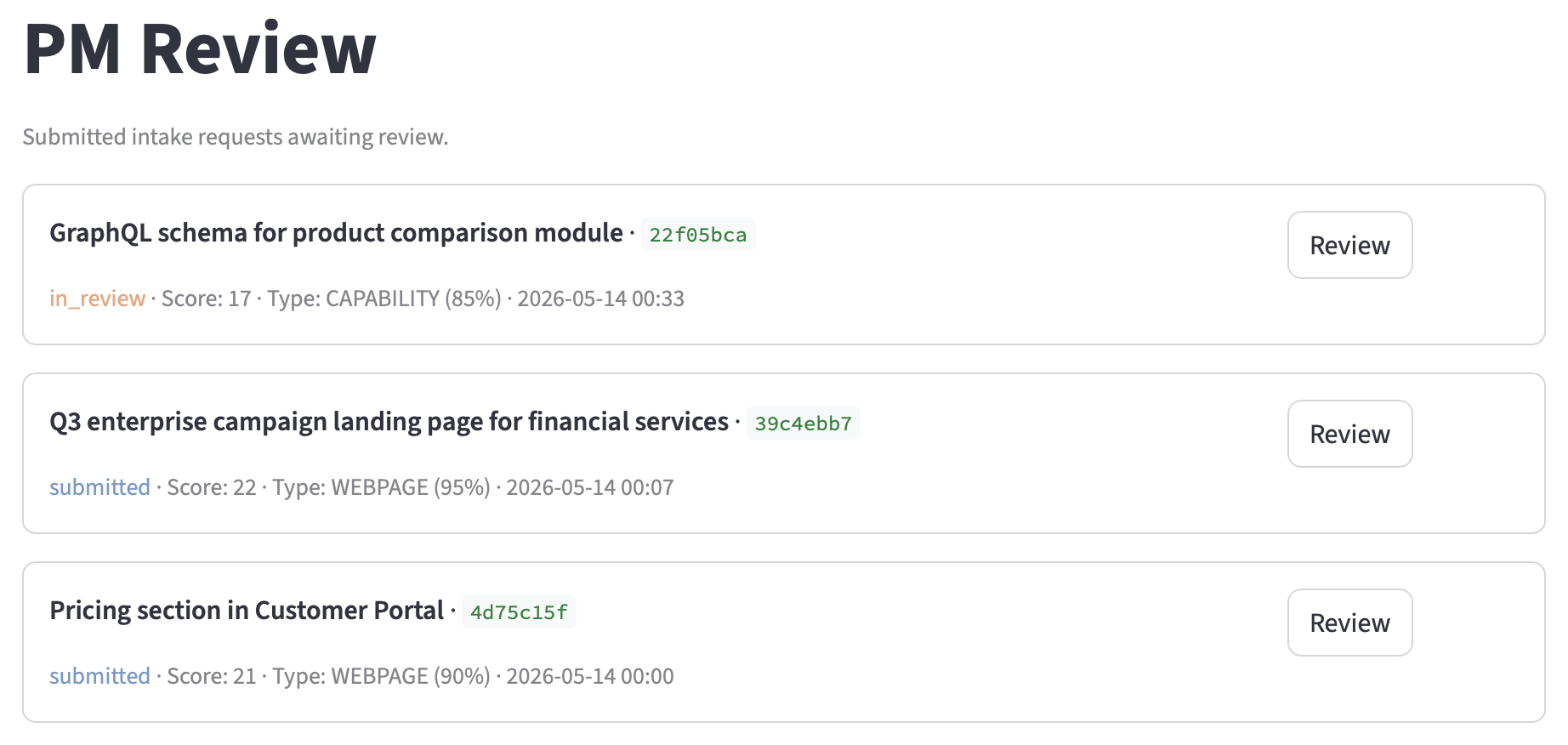
PM Review Interface with Request Queue
This part was fairly routine. PM review page displays pending intake requests in a queue (list). Each request shows the feature name, readiness score, copilot’s classification guess, and submission timestamp. The PM clicks into a request and sees the full structured record, the recommendation, and the conversation transcript.
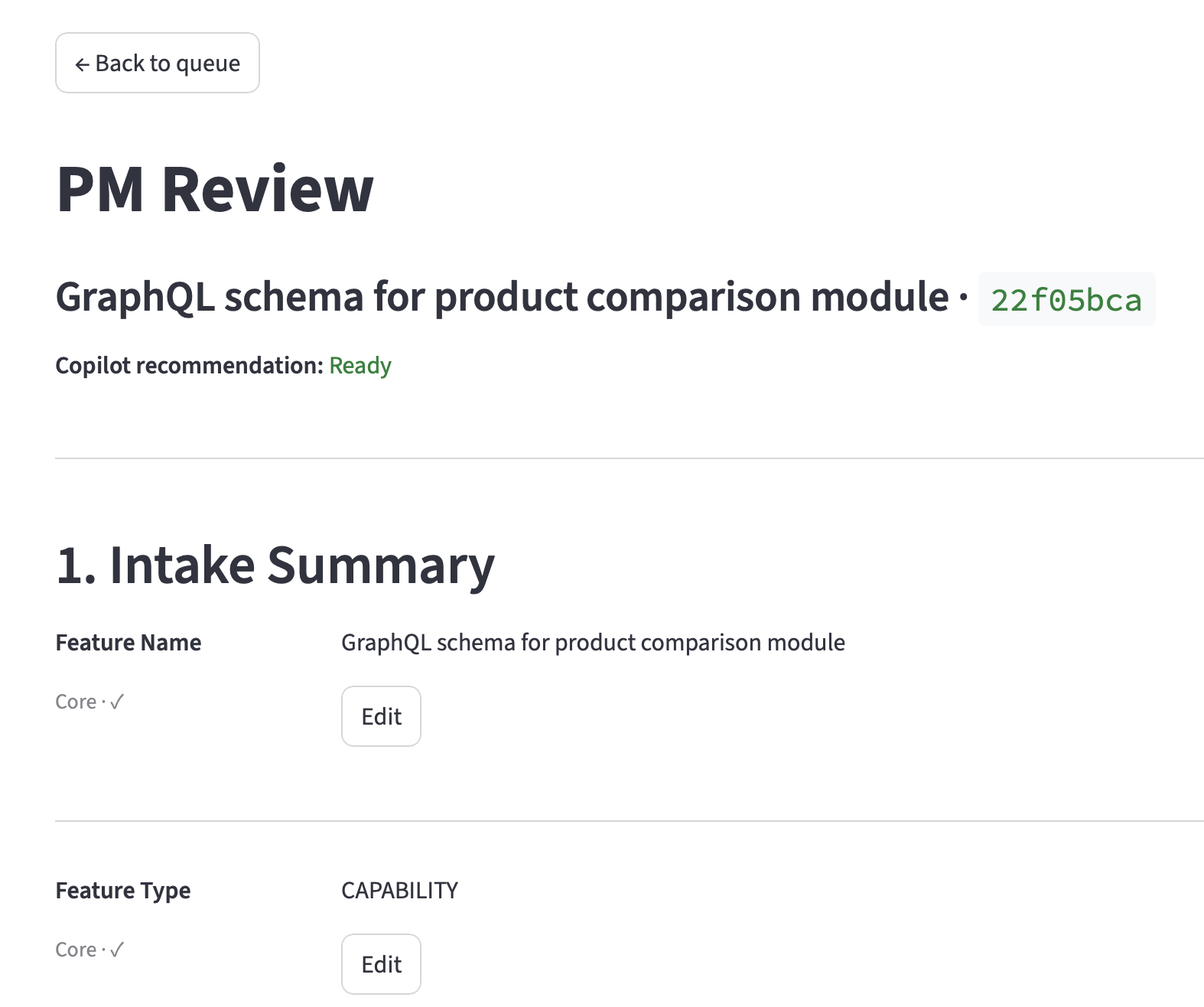
The detail view has five sections: intake summary (each field with its tier and status), feature type selector (with the copilot’s suggestion pre-selected), copilot recommendation with rationale, boost inputs editor, and a collapsible conversation transcript.
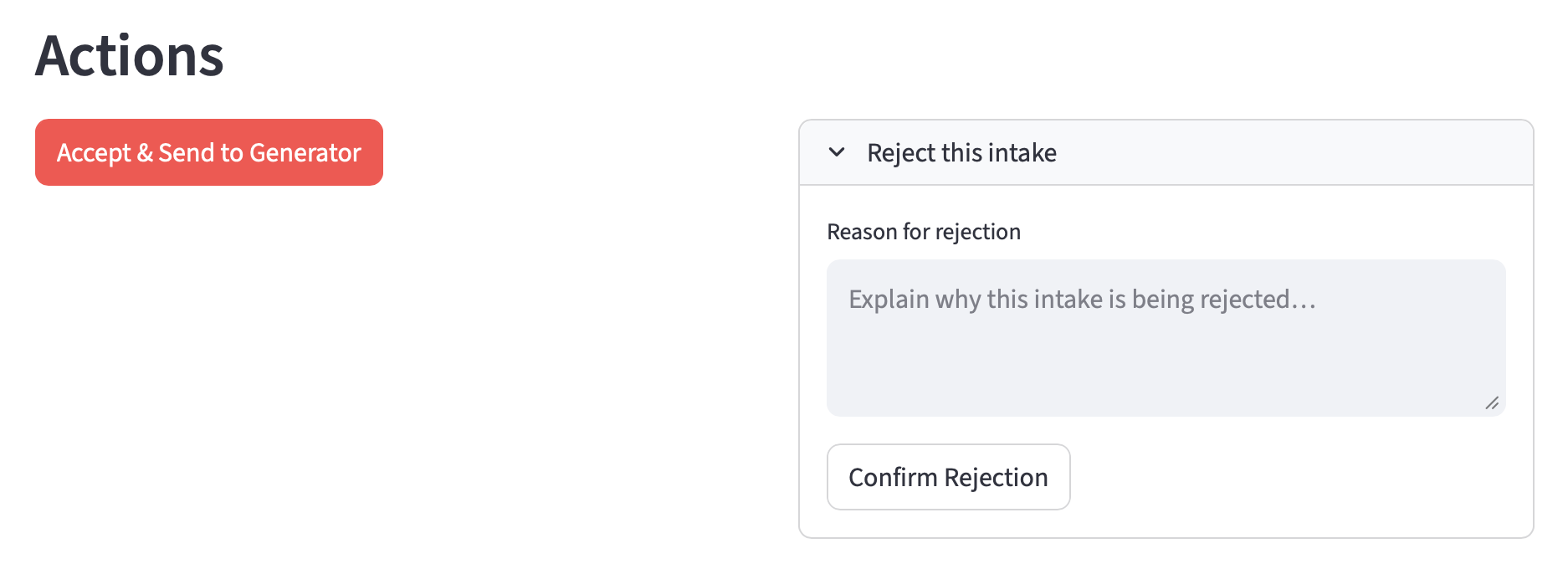
The PM must confirm the feature type before the Accept button activates. On accept, the system assembles a Generator input and previews it before triggering the pipeline.
Two-Gate Architecture
Most of the tools I’ve built so far have been pipelines: structured input in, structured output out. This week’s design problem was fundamentally different: how to transform unstructured input into “good-enough” structured output. What I envisioned was an intake process with two gates:
- Copilot (Claude) - The copilot’s gate is conversational: when has it extracted enough to summarize? This gate optimizes for stakeholder experience. It never blocks submission. If the stakeholder can’t answer basic questions, the copilot wraps up early and reports what it has. “I don’t know” is treated as signal, not failure.
- Product Manager (human) - The PM’s gate is the quality decision: is this good enough to generate a spec? The PM sees the structured intake record, the copilot’s recommendation (accept, accept with caveats, or needs more input), and a rationale. The PM can override the feature type classification, add boost inputs, edit any field, and accept or reject.
Assuming the request passes through both gates, the system will then generate a feature spec.
Supabase Persistence
With the addition of the intake code, I realized the original session-state approach would break immediately on Streamlit Cloud because the stakeholder and PM sessions are separate. So, I added an intake_requests table in the Supabase PostgreSQL database I set up last week. The stakeholder completes a conversation, the copilot writes a row with status submitted, the stakeholder gets a reference ID.
Advisor Tool Integration (Take Two)
Last week the advisor tool didn’t add value for structured rubric scoring. This week I brought it back for the intake copilot, where the decision-making is genuinely ambiguous. Sonnet drives the conversation and consults Opus when it’s unsure about feature type classification or when the copilot’s recommendation is borderline. The advisor tool is wired into the conversation call via the advisor_20260301 beta, with max_uses: 2 per conversation. It fires when the model decides it needs help, not when I hard-code a confidence threshold.
To be honest, I’m still not sure how much value the Advisor tool adds, relative to the cost.
”Ground Truth” Quality Measurements
As part of this week’s project, I suggested to Claude that we measure how many fields the copilot extracted correctly compared to a hand-written case input (“ground truth”) representing what a skilled PM would produce from the same request. Here are the results:
| Metric | SE | PMM | Eng Lead | Average |
|---|---|---|---|---|
| Conversation turns | 8 | 3 | 7 | 6.0 |
| Readiness score | 20/24 | 24/24 | 20/24 | 21.3/24 |
| Ground truth capture | 5/6 | 6/6 | 6/6 | 94% |
| Feature type correct | No | Yes | Yes | 67% |
| Recommendation accurate | Yes | Yes | Yes | 100% |
94% extraction accuracy from messy conversational input. The copilot captured what the stakeholder said; the PM fills in what they didn’t.
What I Learned
Pipelines and Conversations Are Fundamentally Different Products
Most of the other tools I’ve built have been pipelines. Input goes in one end, output comes out the other. The copilot is a conversation. It handles ambiguity, incomplete information, and stakeholders who don’t know the answers. The design patterns are different: a pipeline optimizes for throughput and quality. A conversation must also optimize for the experience of the person talking to it.
The failure modes are also different. When a pipeline gets bad input, it produces bad output. When a conversation gets bad input, it asks a clarifying question. The copilot’s ability to say “that’s totally fine, the product team can figure that part out” and move on is something a form can never do. Forms punish incomplete knowledge. Conversations accommodate it.
The Two-Call Split: Separate What the Model Says from What It Knows
I hit a persistent bug where the model would produce a tool call and forget to actually talk to the stakeholder. It seems you can’t reliably get a model to produce both a natural language response and a structured tool call in the same API call. When both are available, the model treats the tool call as the “main action” and stubs out the text.
After a full day debugging, I found a solution: two separate calls per turn.
- The first call generates the copilot’s natural language response (no tools available, so the model can’t skip the text)
- The second call extracts structured data from the conversation into an
IntakeRecordwith 12 weighted fields across three tiers
Separating conversation from extraction solved the issue. The stakeholder sees a conversation. The system sees structured field updates. Neither interferes with the other. The key takeaway: any time I need an LLM to both talk to a user and extract structured data, split the calls.
”I Don’t Know” Is the Most Informative Answer
When a stakeholder says “I don’t know,” it tells you three things. First, that field is a gap. Second, the stakeholder’s knowledge boundary is here. Third, asking more complex questions will be unproductive. Three consecutive “I don’t know” answers trigger the copilot to wrap up early.
The intake record tracks the knowledge boundary separately from gaps. An unasked field (the copilot chose not to ask because it was already wrapping up) is different from an unknown field (the stakeholder was asked and couldn’t answer). The PM sees both. A request where the SE answered 5 of 12 questions and said “I don’t know” to the rest gets a very different recommendation than one where the PMM answered all 12.
Extraction Discipline: Don’t Infer What the Stakeholder Didn’t Say
The extraction agent initially populated fields aggressively, inferring values the stakeholder never provided. Readiness hit 24/24 after two messages because the model filled in “reasonable” success metrics, dependencies, and scope boundaries from context clues. The intake looked complete but was full of model assumptions.
The fix was strict extraction rules: only mark a field as populated if the stakeholder explicitly provided that information. No inference, no extrapolation. When in doubt, leave the field empty. Accurate gaps are better than false completeness. The PM can fill remaining gaps from their own context, but they need to know which gaps are real.
Claude is Surprisingly Bad at Feature Type Classification
The intake copilot classified a logged-in customer pricing portal as a Capability at 85% confidence. It was wrong (it’s an Experience), but it was confidently wrong. No confidence threshold would have caught this because the model genuinely believed its classification.
Rather than trying to fix the classifier, I designed around it: the PM confirms or overrides the type before the request hits the Generator pipeline. The copilot’s classification drives question strategy during the conversation, but it’s explicitly revisable. It works for now, but I’m surprised at the poor results, given that the Advisor tool was specifically wired in to handle this ambiguity.
Final Thoughts
Week 11 ended with a request queue that worked but wasn’t usable. Week 12 replaced it with a conversation that feels natural and handles information gaps gracefully.
The conversation engine, the two-gate architecture, and the persistence layer are all reusable patterns. The two-call split (separate conversation from extraction) is a technique I’ll use again. The adaptive question depth (read signal density, don’t ask a persona label) is a design principle.
Next up: After weeks of PM tooling, it’s time for something fun. I’ll be building “Dino”, the AI Vegas dining and entertainment concierge. Completely different domain, built AI-native.
Week 12 complete. The feature factory has a front door now.