What I Built
Part 1 gave me a canonical data model and nine documents worth of product specifications. Part 2 was about building product interfaces that make the data usable and useful for three personas: Marketing Operations Engineer, Demand Generation Manager, and Content Strategy and Operations Manager. The build produced four distinct modules.
Reference Mode
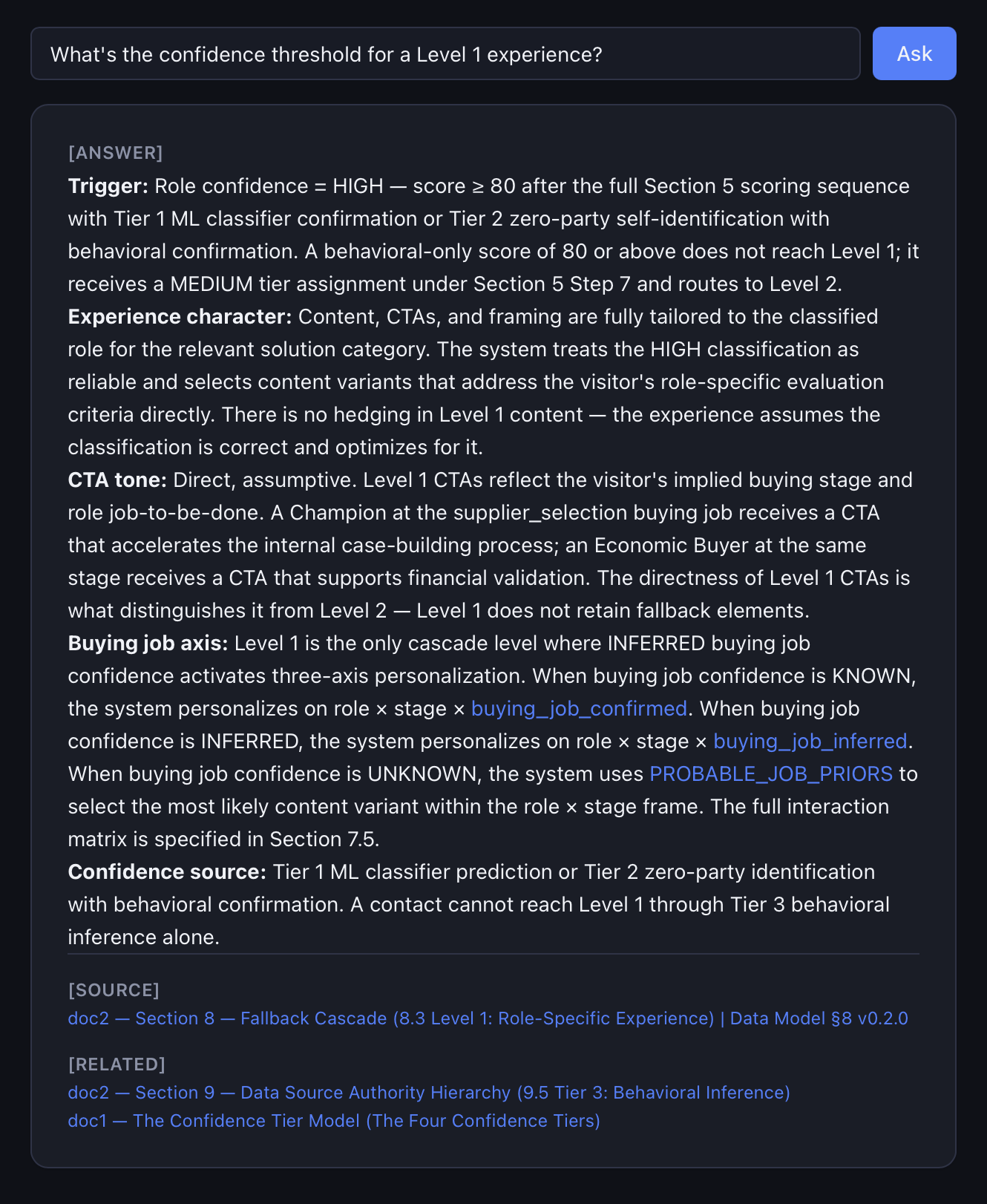
When you know exactly what you need and want the answer fast, Reference Mode speeds things up. Ask it a natural-language question like “what’s the confidence threshold for a Level 1 experience?” and it searches the underlying strategy documents and returns a precise, hallucination-free answer grounded in data, with a citation back to the source. This is the mode a marketing ops person reaches for constantly while configuring an account, day to day, question by question.
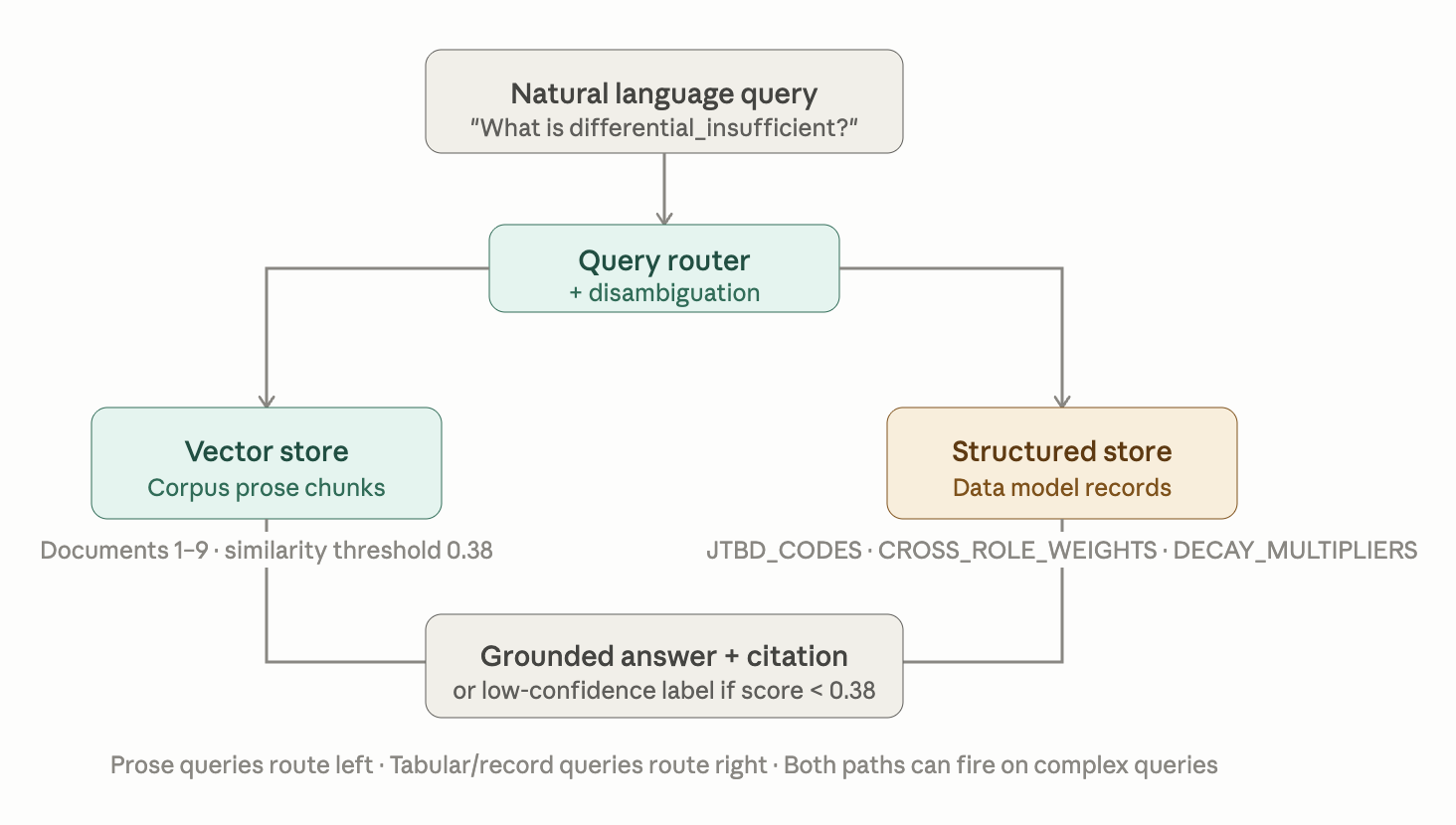
The retrieval layer is built as two distinct stores: a vector index for corpus prose, and a structured index for data model records like JTBD_CODES, CROSS_ROLE_WEIGHTS, and DECAY_MULTIPLIERS. Prose and tabular data have fundamentally different retrieval signatures, and a single vector store handles one well and the other poorly. Getting the similarity threshold right took real empirical work, not a config value copied from a spec doc. More on that below.
Advisory Mode
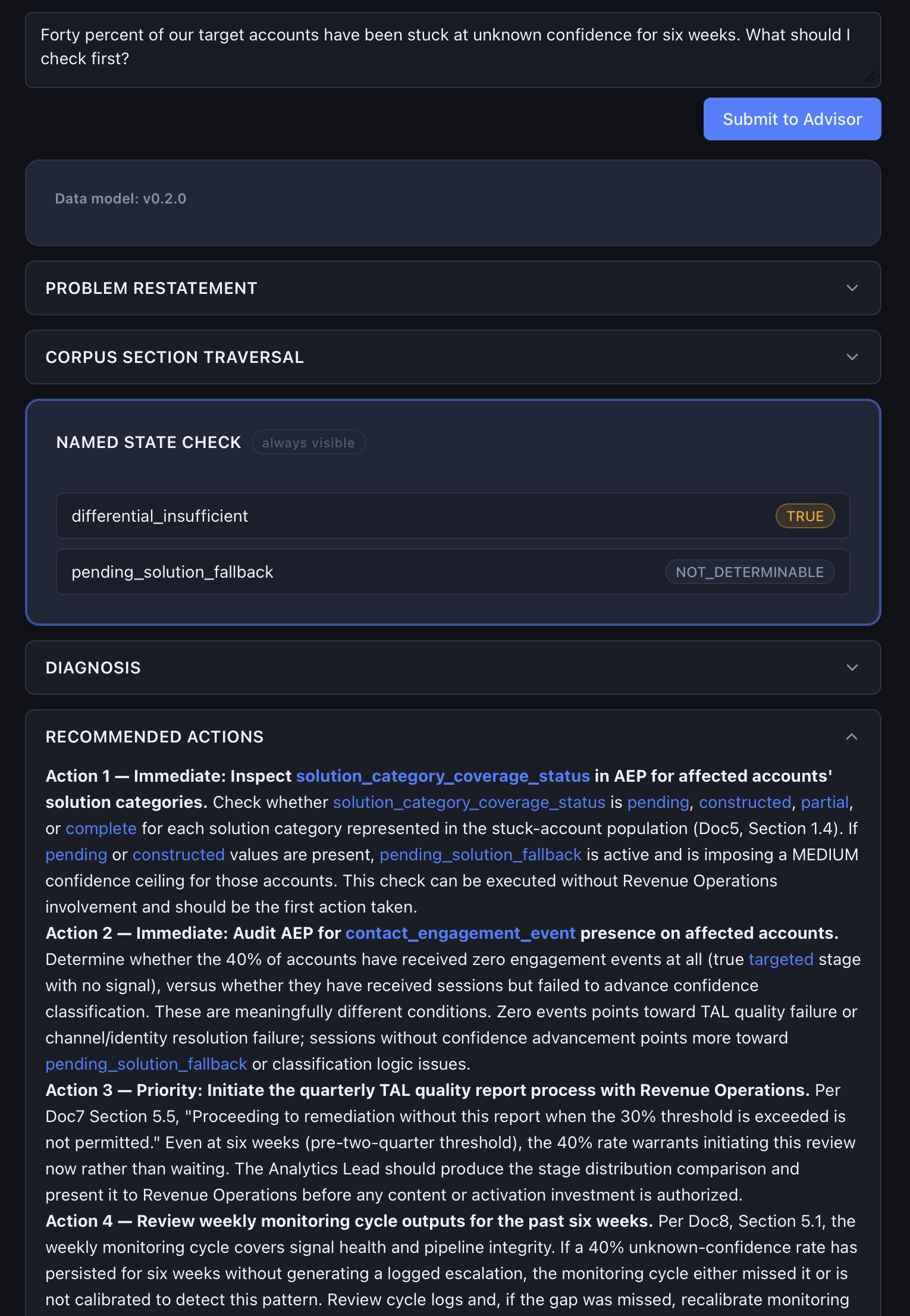
When you have a program problem, you can ask the Advisor things like, “Forty percent of our target accounts have been stuck at unknown confidence for six weeks. What should I check first?” Instead of retrieving a fact, the Advisor reasons across the whole strategic framework and comes back with a diagnosis and a recommended next step. It’s built for the person running the program week to week and making judgment calls.
Advisory Mode is scoped to three MVP problem types: classification state diagnosis, cohort performance diagnosis, and sales escalation readiness. That was a deliberate product decision based on three problem types that demand gen managers face on a recurring basis. The other types are defined and documented, but they’re not in v1.
Under the hood, every Advisory query assembles its system prompt at runtime: a base instruction layer, plus whatever corpus sections are relevant to the question, plus the user’s actual session context. That’s a meaningfully different skill from writing a good static prompt.
Guided Workflow Mode
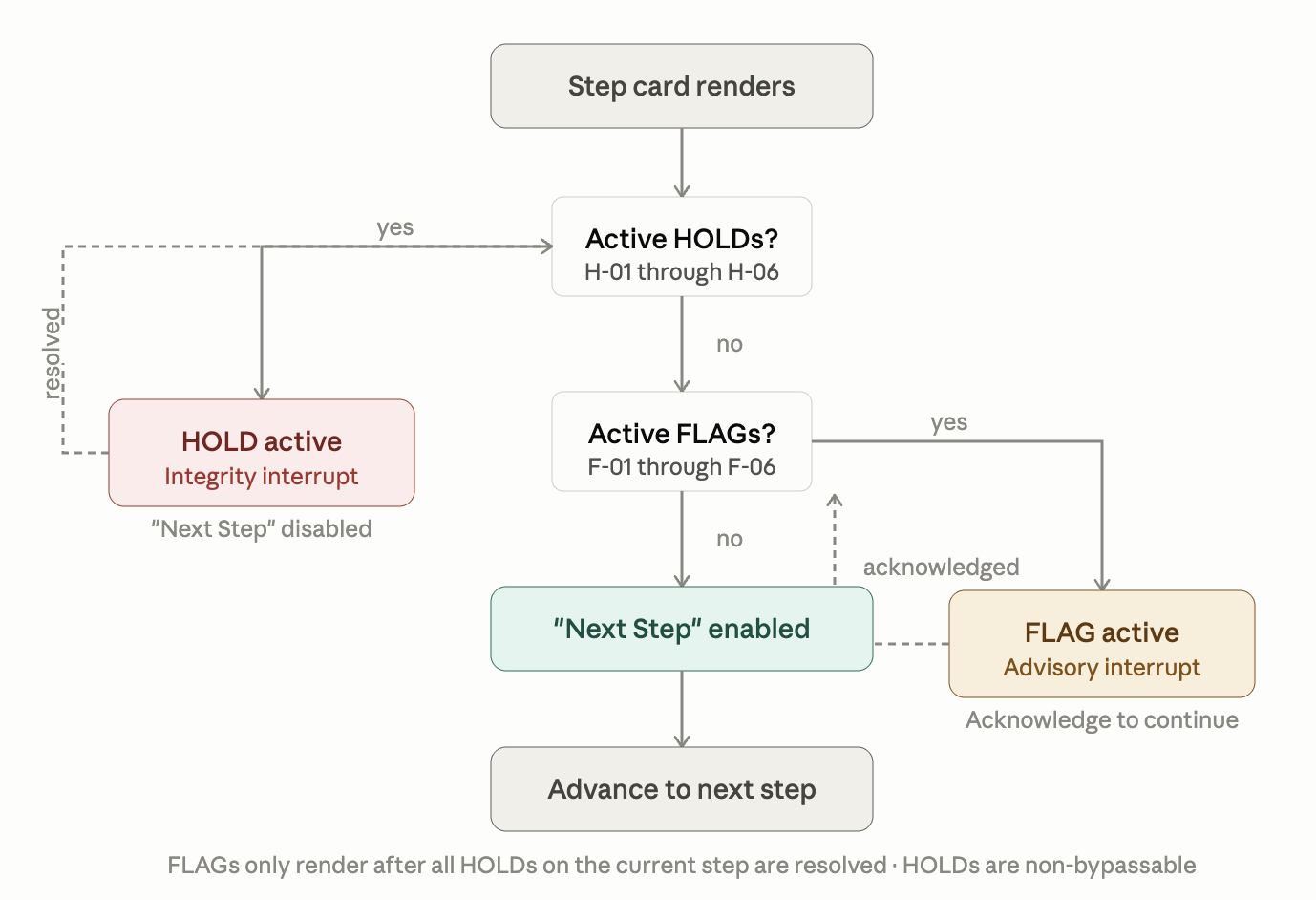
This mode walks users step by step through three predefined processes: onboarding a new account (18 steps), commissioning content before it goes live (12 steps), and running a signal-monitoring check (8 steps).
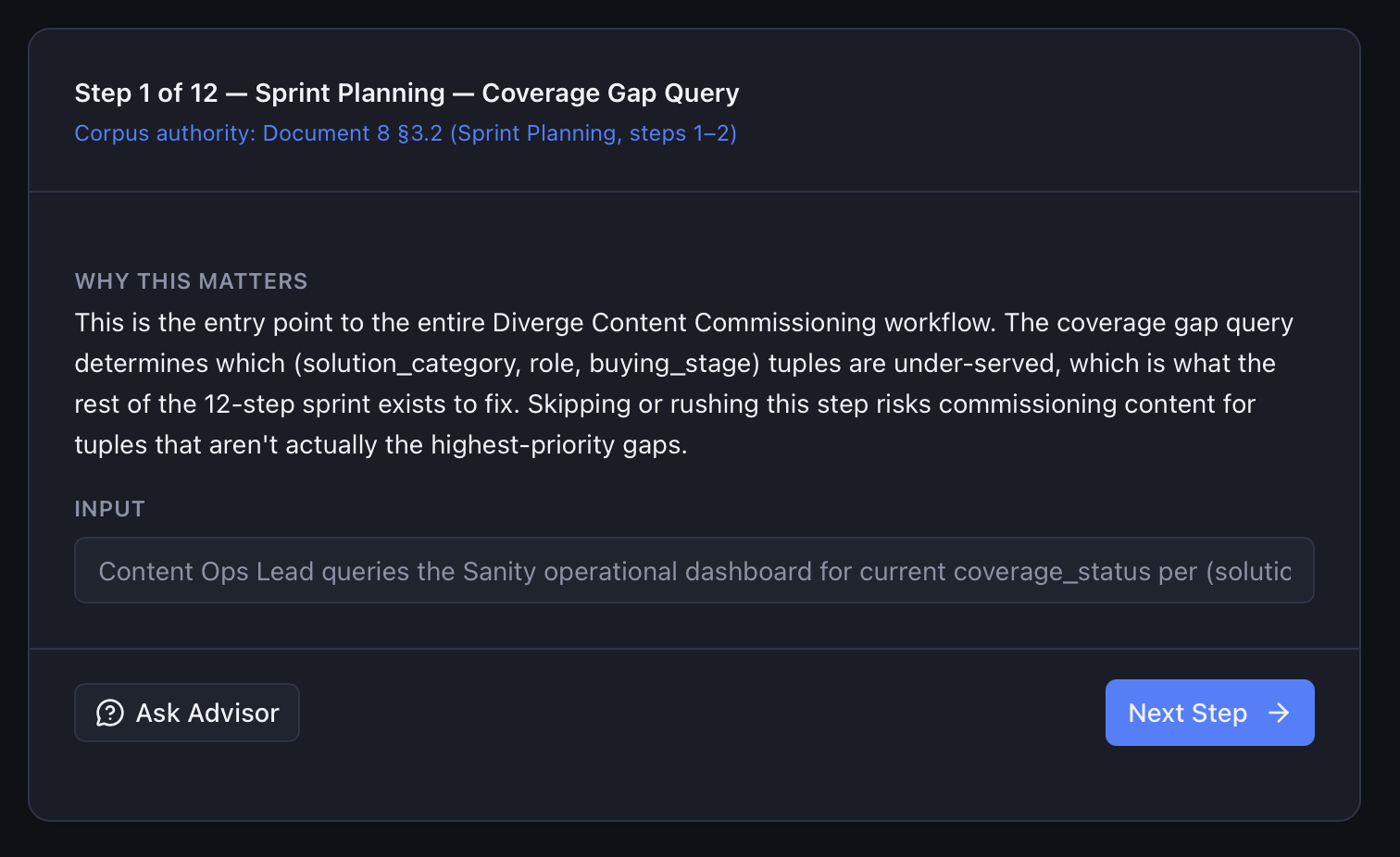
The design decision that makes this mode work is the FLAG/HOLD interrupt system:
- HOLD is an integrity interrupt: a non-bypassable condition that blocks step advancement until resolved.
- FLAG is an advisory interrupt: a warning the user must acknowledge before proceeding, but only after all HOLDs on the current step are clear.
These aren’t a single catch-all warning state; they’re two distinct states with different semantics and different implications for the user. That distinction governs how the whole mode behaves: the system never silently lets a user advance past a real problem.
Website Experience Simulator
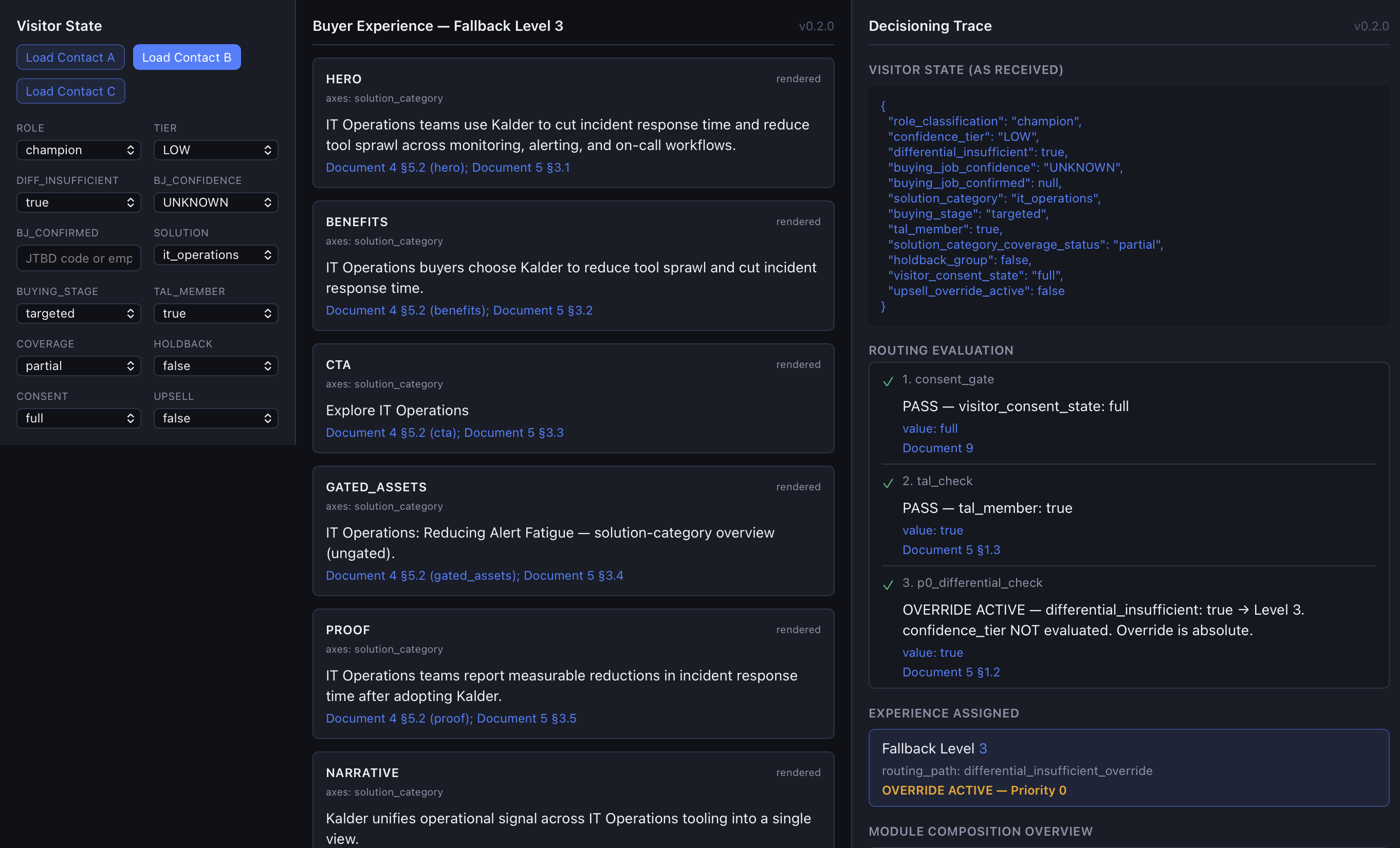
This is the “show, don’t tell” piece. Feed it a visitor state (e.g., buying group role, confidence level, solution category, buying stage) and it renders what that visitor would see on the website, with a decisioning trace panel showing every rule that fired to produce that experience. Comparison mode puts two visitor states side by side, so you can watch the exact same page structure produce two completely different experiences and see, in the trace, precisely why.
What I Learned
RAG and Retrieval Engineering
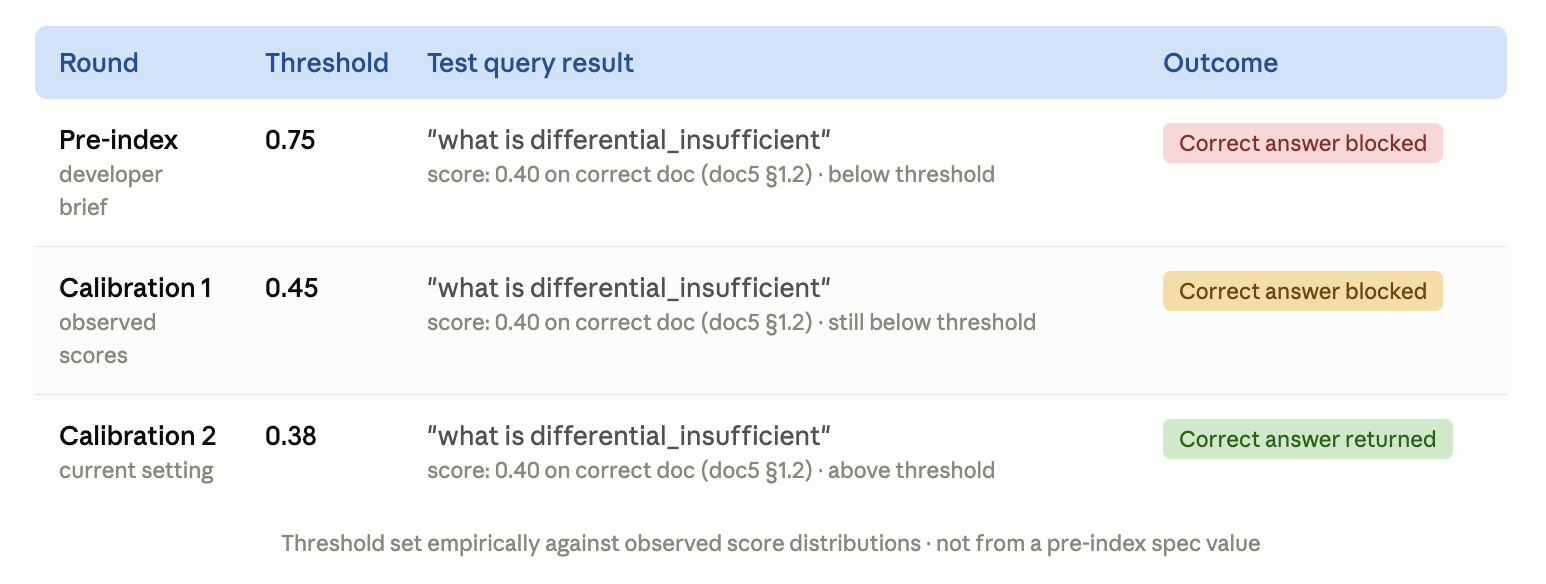
Before building, I wrote a developer brief: a technical specification that translated the council sessions and architecture decisions into concrete implementation targets, including a pre-index similarity threshold of 0.75 for Reference Mode’s retrieval. That number was a guess set before the index existed. Once real queries started hitting Pinecone against real text-embedding-3-small scores, a query for “what is differential_insufficient” returned the correct answer (doc5 §1.2) at a score of 0.40. Below threshold. The system was right and reporting itself as not confident.
I recalibrated twice: first to 0.45, then to 0.38, each time against actual observed score distributions rather than a number that sounded reasonable on paper. That’s the real skill: retrieval tuning is an empirical practice, not a one-time setting. A threshold that’s correct for one corpus and one embedding model will be wrong for another. You earn the right number by running queries against real data.
I also built a rule that any below-threshold result gets labeled as such rather than quietly returned as if it were confident. An AI Advisor that occasionally says “I’m not sure” is more trustworthy than one that never does.
LLM Product Design
Advisory Mode had to distinguish two completely different kinds of confidence. Classification confidence is a property of the data: how sure the model is about a visitor’s role. Diagnostic confidence is a property of the Advisor’s own answer: how sure it is that its reasoning is right. Conflating those two is exactly the kind of thing that makes an AI product quietly untrustworthy. Every Advisory output explicitly names and checks for two program states (differential_insufficient and pending_solution_fallback) before it’s allowed to answer. Making implicit states first-class named concepts is a design discipline, not just an implementation detail.
The UX critique session that closed out the week produced four specific findings from treating myself as a “clueless executive” who has never seen this product before. PT taxonomy codes (PT-1, PT-2, PT-5) were exposed directly in the UI as user-facing labels: internal architecture language a first-time user has no way to decode. “Corpus” appeared as unrecoverable jargon. The three Guided Workflows were grouped by implementation pattern rather than by client journey position, burying Onboarding (a genuine prerequisite) as a peer option alongside operational tools a user might never need on day one. And there was no orientation layer anywhere: a first-time user had no way to know what to type into Reference or Advisory Mode, or what to expect back.
Three of those four findings are afternoon-scale copy and labeling fixes. The fourth (the missing orientation layer) requires real structural design work. Both are true at the same time: the build is architecturally correct and a first-time user still couldn’t pick it up and use it. That gap, between correct and usable, is a product design insight that an engineering-first development process will produce every time unless you explicitly build in a pressure-testing step.
The product packaging itself (three modes mapped to three pricing tiers mapped to four user priorities) is worth naming as a PM decision. The VP sees the demo. The ops engineer renews the contract. The demand gen manager expands it. Designing for all three with the same interface is a mistake; the product should be built for the people who use it every day, with the demo designed separately for the person who approves the budget.
Building With an Agentic Coding Tool (and Verifying the Outputs)
I ran Claude Code through this entire build: scaffolding, implementation, bug fixes, test authoring, across two separate Next.js applications and a Python scoring engine sidecar. Directing a coding agent through a multi-week, multi-session build with explicit read/write boundaries and sequenced commits is its own skill, distinct from writing the code by hand.
But the more valuable skill turned out to be the opposite instinct: verifying the agent’s account of what it did. Before I could trust this build was actually done, I had to verify it, and what I found was a real gap between “reported complete” and “actually complete.”
The website experience simulator had five separate commit messages claiming passing test suites: 50 out of 50, 54 out of 54, 27 out of 27. Zero test files existed anywhere in that build. The numbers were real at some point, in some terminal, and then never committed.
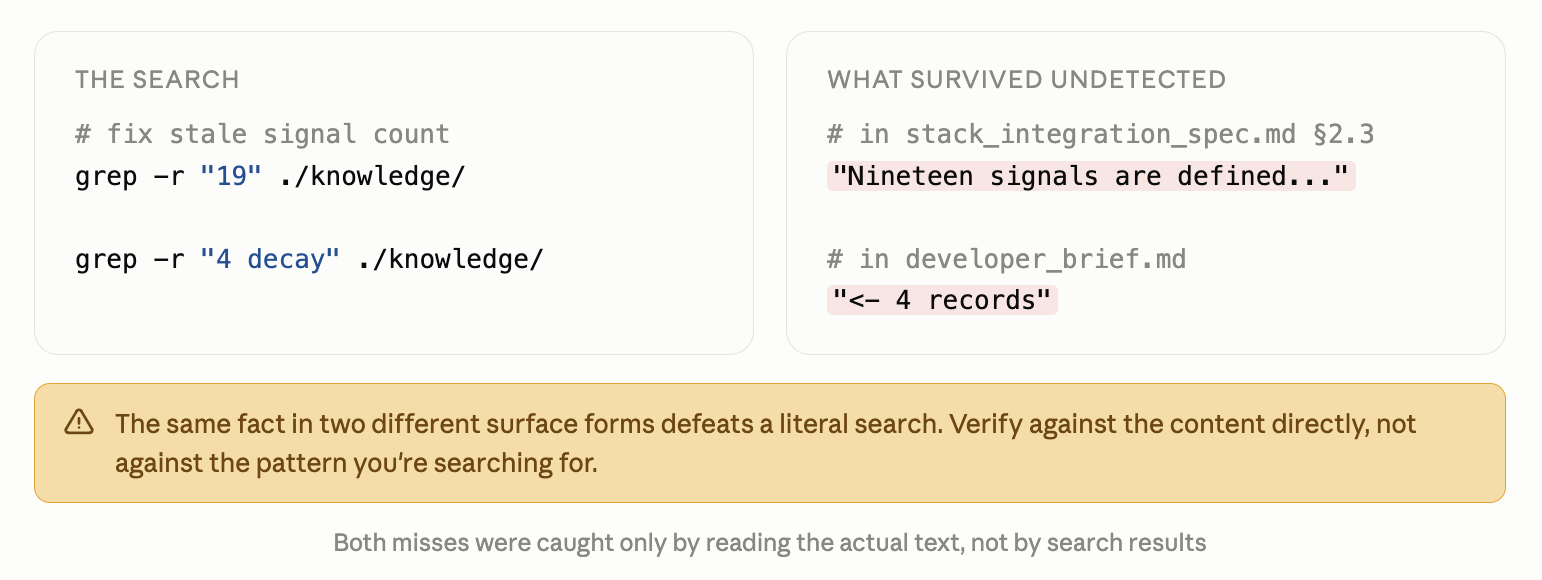
And twice, a stale data count survived a fix that should have caught it, because the fix searched for one way of writing a number and missed the other. A signal count written out as “nineteen” survived a pass that only searched for the digits “19.” A decay multiplier count phrased as “4 records” survived three separate searches for the phrase “4 decay” because that exact phrase never appears anywhere in the file.
Part 1 built the canonical data model that all of this depends on. Part 2 was the first real test of whether five independent documents that are supposed to derive from that model actually stayed in sync with it. Three of them hadn’t.
None of this is a story about Claude Code doing bad work. The code quality was pretty good. The lesson for me was that “the agent said it’s done” and “it’s actually done” are two different claims, and the gap between them doesn’t close itself. A human needs to be in the loop.
Challenges
The prevalent challenge with this project was actually the complexity of prose, not code. I am an experienced editor, but managing 5,000 lines of content across 9 documents is not easy, and it has real downstream implications for the functionality. When agents rely on documentation, a typo or stray unchanged value isn’t just a copy error; it’s a bug. I found a lot of bugs.
The hard part wasn’t any single decision. It was not letting the momentum of “we’re already fixing things” turn every open question into another fix, when some of them are genuinely design calls that deserve their own dedicated attention rather than getting resolved as a side effect of an unrelated cleanup pass. I had to decide what to fix immediately vs. what to leave open, consistently. Some issues got fixed immediately: the stale counts, the missing tests, the unpopulated deliverable file. Others were named and deliberately left alone.
Final Thoughts
This week was a success from a learn-by-doing perspective. The engineering outcome was a real working product with four distinct modules, all firmly grounded in a solid foundation of structured and unstructured information. I also found a significant architectural bug and fixed it with a test suite to ensure it stays fixed.
The design critique I ran tells a different story. A “clueless noob” pressure-test of the finished build confirmed my hunch that the tool was not something a first-time user could pick up and use without significant training. Internal taxonomy codes leaking into the UI. No orientation layer anywhere. This is the consequence of prioritizing the system ahead of the user. It was an intentional choice on my part to learn how the systems work, but the end result is practically a poster child for why starting with the user matters so much. Future iterations of this concept will follow a Design Thinking process.
Week 15 complete. A working product, built on a solid data foundation, that blends conversational interfaces with hybrid retrieval of structured and unstructured information.